
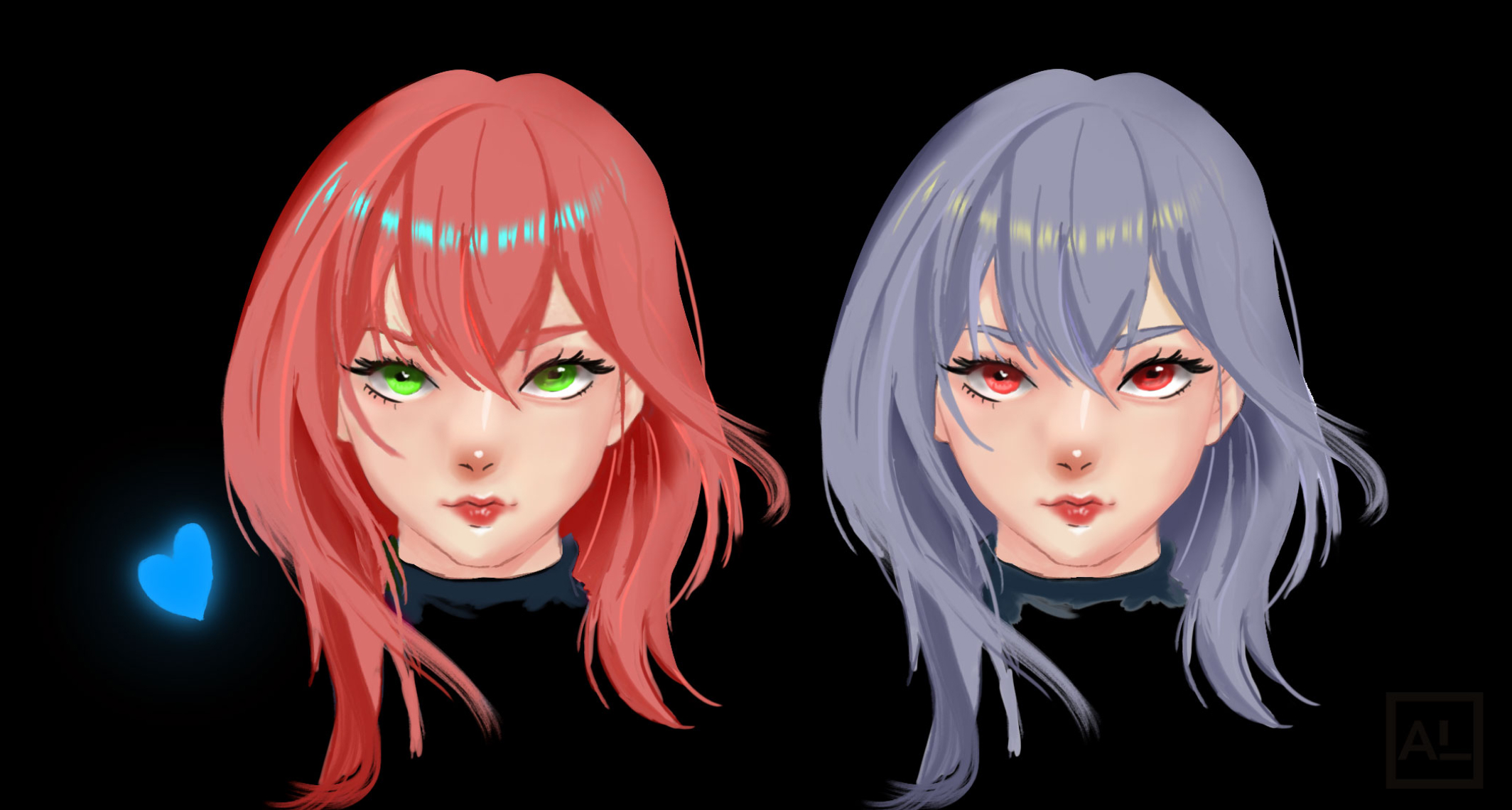
I want to be upfront about how I think about color theory, because I think most guides get the order wrong.
Color theory is not something you read first and then apply. It’s something you apply badly, make real mistakes, notice why those mistakes happened, and then go back to the theory and finally understand what it’s telling you. You can’t learn to swim from reading a book. You have to get in the water first — and the theory becomes useful once you’re already treading water and wondering why your arms are doing the wrong thing.
I didn’t go to art school. I never had a color theory class. I learned by painting things that looked wrong and working backwards to find out why. One of the most concrete examples: I used to paint skin that looked like plastic. Not because I didn’t know what skin looked like — I knew. The problem was I was playing it safe with color, only making the skin tone darker for shadows instead of actually shifting the hue. The result was technically correct but visually dead. It looked like a 3D render, not a painting.
That specific mistake — and figuring out how to fix it — taught me more about color than any textbook chapter could have. That’s the spirit this guide is written in. We’ll cover all the foundational concepts, but we’ll cover them the way they’re actually useful: connected to the real problems they solve.
📌 How to use this guide:
Don’t try to memorize everything here before picking up your stylus. Read a section, then go paint something trying to apply that one idea. Come back when it doesn’t work and re-read. The theory will mean something different the second time — because now you have a real problem it’s solving.
Part 1 — The Three Properties of Every Color
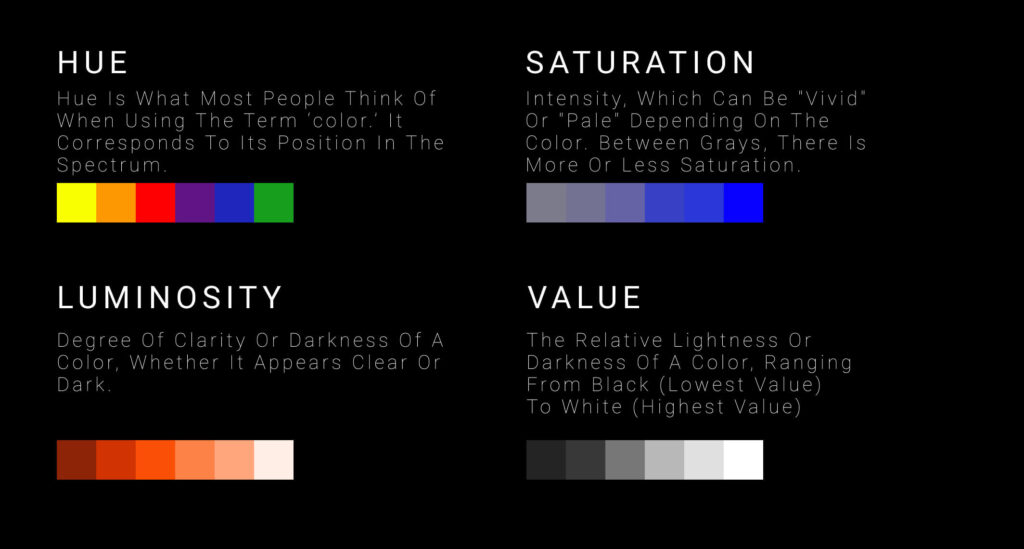
Before the color wheel, before harmonies, before any of the more interesting applications — you need to understand the three dimensions every color has. These aren’t abstract concepts. They’re the actual controls you’re adjusting every time you touch the color picker in Clip Studio Paint, Procreate, or Krita.
1. Hue — Which Color It Is
Hue is the most basic property: is this color red, orange, yellow, green, blue, or purple? It’s what you’re changing when you move around the outer edge of the color wheel. Red and crimson are both red hues. Sky blue and navy are both blue hues.
Hue is what most people think of when they say “color.” But by itself, it tells you the least about how a color will actually behave in a painting. Two colors with the same hue can look completely different in context depending on their value and saturation.
2. Value — How Light or Dark It Is
Value is the most important property in all of visual art, and the one most beginners think about least. Value describes where a color sits on the scale from pure black to pure white. A dark navy blue and a pale sky blue have the same hue but completely different values. A red and a green can have identical values — which is why they often look similar in greyscale.
Value structure is what makes an image readable from a distance, in thumbnail form, in black-and-white reproduction, or in any situation where color information is reduced. Strong value contrast creates impact. Poor value structure makes even beautiful colors look flat and confused. This is why the classic advice “learn to paint in greyscale first” is genuinely good advice — it forces you to think in values before adding the complexity of hue and saturation on top.
💬 From Allard’s practice:My dark-to-light painting process is essentially a value-first workflow. I block in the darkest shapes first — establishing where the shadow masses are — and then paint toward the light. By the time I’m adding the brightest highlights, the value structure is already locked in. The color is layered on top of a foundation that’s already working. If you start with bright colors and try to add shadow later, you’re fighting the value structure instead of building with it.
3. Saturation — How Intense or Pure It Is
Saturation describes how vibrant or muted a color is. A fully saturated red is the most intense, pure red possible. Desaturate it partially and it becomes a dusty rose. Desaturate it fully and it becomes grey. Same hue, same value, completely different character.
Saturation is one of the most powerful tools for creating visual hierarchy. The most important element in a composition can be made more saturated while surrounding elements are kept muted — the eye naturally travels toward color intensity. Conversely, a painting where everything is maximally saturated becomes visually exhausting because nothing reads as more important than anything else.
In skin tones, saturation is what separates healthy-looking skin from either washed-out or artificially vivid skin. Shadow areas of skin are typically less saturated than lit areas — but they’re not grey. They’re a lower-saturation version of the base skin hue, often with a hue shift toward cool (more on this in the skin section).
🎯 The most practical takeaway from these three properties:
When a color isn’t working in your painting, identify which property is the problem before you start randomly adjusting. Is the hue wrong (it’s the wrong color family)? Is the value wrong (it’s too light or too dark relative to its surroundings)? Is the saturation wrong (it’s too vivid or too muted for its role)? Diagnosing correctly means you make one targeted adjustment instead of changing everything and losing what was working.
Part 2 — The Color Wheel and Why It’s Actually Useful
The color wheel gets introduced in every art class and then immediately feels abstract and useless. Here’s why it’s actually one of the most practical tools in your kit — if you use it correctly.
The color wheel organizes colors by their relationships to each other. It exists in two main versions that you’ll encounter:
- RYB (Red, Yellow, Blue) — the traditional artist’s color wheel, based on physical paint mixing. This is the one with red/yellow/blue as primaries and is most relevant to traditional painting.
- RGB (Red, Green, Blue) — the digital color model, where light mixes additively. This is what your screen uses and what digital art software is built on. The primaries and mixing results are different from RYB in important ways.
For practical art-making purposes, the RYB wheel is what you’ll use for thinking about color relationships and harmony. The RGB model is what’s running underneath your software — useful to understand when you’re working with blend modes like Color Dodge/Add, but not what you’re using when you decide which colors to put next to each other.
Primary, Secondary, and Tertiary Colors
| Type | Colors | How They’re Made |
|---|---|---|
| Primary | Red, Yellow, Blue | Cannot be mixed from other colors |
| Secondary | Orange, Green, Purple | Mix two primaries: R+Y=Orange, Y+B=Green, B+R=Purple |
| Tertiary | Red-orange, Yellow-orange, Yellow-green, Blue-green, Blue-purple, Red-purple | Mix a primary with an adjacent secondary |
The reason knowing this matters: when you’re mixing colors (physically or digitally), predictable mixing results come from understanding these relationships. Mixing complementary colors (colors across from each other on the wheel) produces neutrals and grey-browns — useful for shadows and desaturated areas. Mixing adjacent colors produces smooth transitions. Mixing colors from opposite temperature zones (warm and cool) produces the vibrant optical tension that makes a painting feel alive.
Part 3 — Color Temperature: The Concept That Changes Everything
If I had to pick one color concept that separates artists whose work feels alive from artists whose work feels flat, it’s color temperature. Not value (which is more foundational) — but temperature, because it’s less obvious and more transformative when you finally get it.
Color temperature refers to whether a color leans warm (reds, oranges, yellows) or cool (blues, purples, blue-greens). And here’s the part that took me time to really internalize: temperature is always relative, not absolute.
A yellow can feel warm next to a cool blue-white. That same yellow can feel cool next to a red-orange. Whether a color reads as warm or cool in your painting depends entirely on what’s next to it. This means you can’t evaluate temperature in isolation — you can only evaluate it in context.
The Warm Light / Cool Shadow Rule
In most natural lighting conditions, there’s a tendency for lit areas to be warmer and shadow areas to be cooler — or vice versa. Sunlight is warm (orange-yellow); the sky shadow it casts is cool (blue-grey). Candlelight is warm; its shadows are cool. Overcast daylight is cool; its shadows are relatively warm.
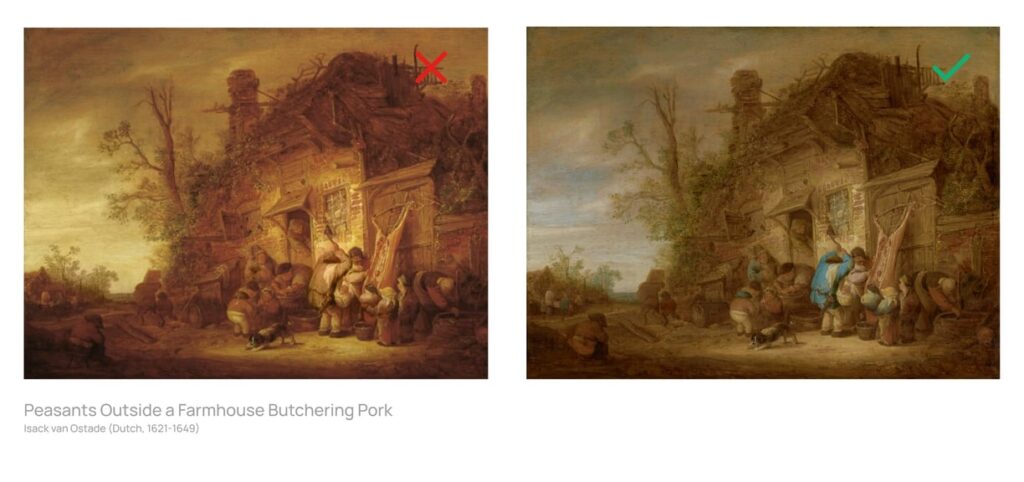
The practical application: when you’re painting shadows, don’t just make them darker. Make them cooler. When you’re painting lit areas, don’t just make them lighter. Make them warmer. The temperature contrast between light and shadow is what creates the feeling of real light falling on a surface.
💬 From Allard’s practice — the plastic skin fix:
For a long time my skin tones looked like plastic. The cause was simple in hindsight: I was playing it safe and only making the skin color darker for shadows. No hue shift. No temperature change. Just a darker version of the same peachy tone. The fix I found: think about what skin looks like without light hitting it. Human skin has blood underneath — in shadow, the red of the blood shows through more, which means shadow skin tends to shift toward red or cool rose tones rather than just getting darker. In areas where light hits the skin directly, I use Color Dodge or Add blend mode to create that luminous quality — it’s physically how skin responds to direct light. The light adds color energy; the shadow reveals what’s underneath. Once I started thinking about skin shadows as warm-red-shifted rather than just dark-peachy, and used Color Dodge/Add for the light areas, the plastic look disappeared completely. The skin started breathing.
Color Temperature in Practice: Skin Tones
Since skin is the surface most digital artists spend the most time painting, here’s the temperature map for skin specifically:
| Area of Skin | Temperature Direction | Why |
|---|---|---|
| Directly lit area | Warm (yellow-orange to warm pink) | Light source (sun, lamp) is usually warm |
| Shadow areas | Cool-red to warm-red (depends on light) | Blood showing through; less warm light penetrating |
| Subsurface scatter zones (ear, nose tip, fingertips) | Warm red-pink | Light passes through thin skin — blood color is visible |
| Cast shadows on skin | Cool (blue-grey to purple-grey) | Shadow reflects cool sky ambient light |
| Bounce light areas (under chin, under arm) | Warm (reflecting environment or ground) | Secondary light source hitting shadowed surface from below |
The most useful test for skin tone: squint at your painting until the detail blurs. The value structure and temperature relationships should still read clearly. If the skin area looks like one flat undifferentiated tone when squinted at, the temperature variation isn’t strong enough.
Part 4 — Color Harmonies: Choosing Colors That Work Together
Color harmony is the set of principles for choosing colors that feel intentional and pleasing together rather than arbitrary or clashing. These aren’t rules — they’re starting points. Every harmony can be used well or badly depending on execution.
“Color theory is best when you’ve already made enough mistakes — then you learn or test the theory to see if it works. You can’t learn how to swim by reading books. You need to go into the water first.”
With that said — here are the harmonies worth knowing, and more importantly, what each one actually does emotionally and visually:
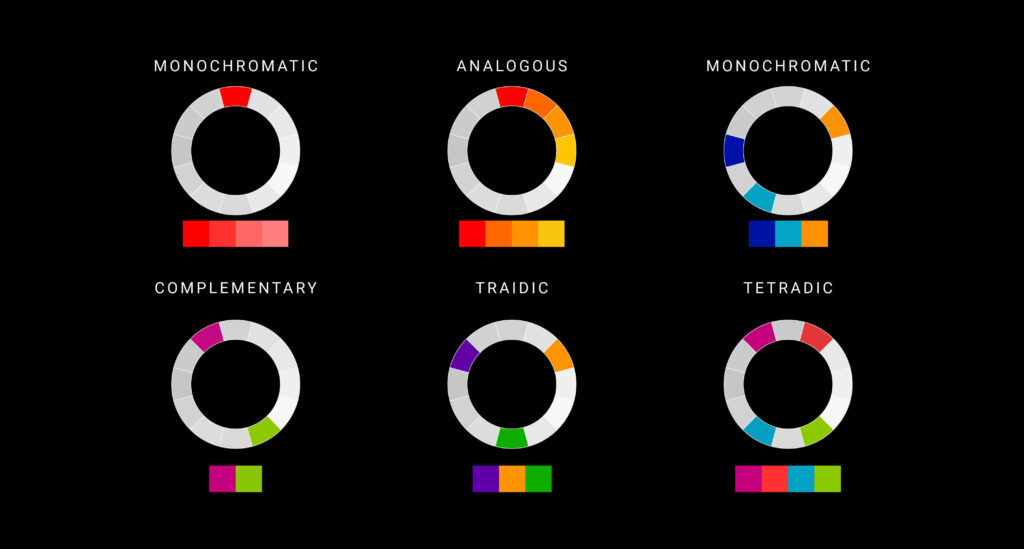
Want to experiment? Try tools like Adobe Color to generate palettes using any of these harmonies.
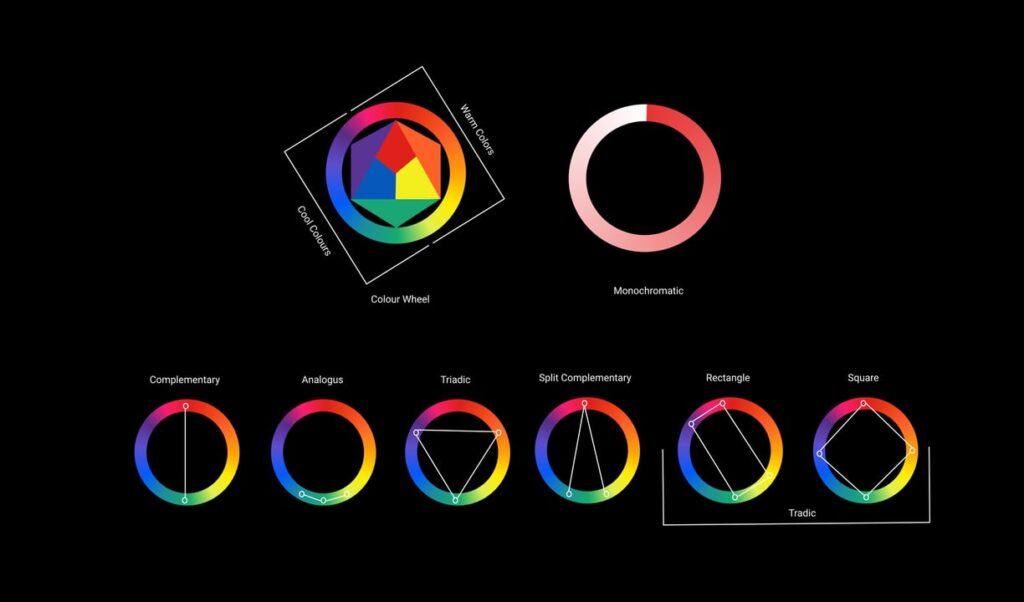
🎨 Monochromatic — One Hue, Many Values and Saturations
A monochromatic palette uses a single hue varied across different values and saturation levels. It creates immediate visual cohesion — nothing clashes because there’s only one color family. The challenge is creating interest and depth within those constraints.
What it communicates: Calm, unified, focused. Monochromatic palettes are common in melancholy or introspective pieces, or in pieces where a specific color mood is the point (an all-blue underwater scene, a golden-hour piece that stays within warm ambers).
Applied to skin: A monochromatic approach to skin means your shadows and lights stay within the same hue family as the base skin tone. It can work — it reads as flat-lit or stylized — but it’s the approach that produces the plastic skin problem I described. Push the saturation and value rather than adding temperature for interest.
Try it: Paint a character using only variations of one blue. Light blue for the lit skin, darker blue for shadows, medium blue-grey for midtones. Notice how it forces you to solve depth and form entirely through value rather than leaning on color contrast.
🎨 Complementary — Two Colors Opposite on the Wheel
Complementary pairs: Red/Green, Blue/Orange, Yellow/Purple. These are the colors that sit directly across from each other on the color wheel. When placed next to each other, they intensify each other — each makes the other appear more vivid. When mixed, they neutralize each other into grey-brown.
What it communicates: Energy, tension, vibrancy. Complementary palettes feel dynamic and high-contrast. They’re common in action scenes, dramatic moments, and anywhere you want visual impact.
Applied to skin: The orange/blue complementary pair is one of the most powerful combinations for skin in daylight — warm orange-based skin in the lit areas, cool blue in the shadow areas. The two colors push against each other in a way that makes both feel more intense. This is the opposite of the monochromatic approach — it’s what produces that vivid, alive quality in well-executed digital skin painting.
Watch out for: Equal amounts of full-saturation complements create jarring vibration — too much visual tension. One color should dominate; the other should be used as an accent. A painting that’s 50% pure red and 50% pure green looks like a Christmas decoration, not intentional art.
🎨 Analogous — Colors Sitting Next to Each Other on the Wheel
Analogous palettes use 2–4 colors that sit adjacent on the color wheel: red/orange/yellow, or blue/blue-green/green, for example. They create natural, cohesive looks because the colors share a hue relationship.
What it communicates: Natural, harmonious, unified. Analogous palettes feel organic — they’re common in nature (autumn leaves, ocean colors, forest greens) and work well for environments and scenes where you want the color to feel seamless rather than contrasted.
The practical use: Analogous palettes are useful for backgrounds and environments that shouldn’t compete visually with characters. A background in analogous greens/blue-greens feels rich but not distracting — it stays in its lane while the character’s colors (which might include complementary or more varied hues) stand forward.
🎨 Split-Complementary — One Color + Two Colors Adjacent to Its Complement
Instead of using a color and its direct complement, split-complementary uses a color and the two colors on either side of its complement. Blue + yellow-orange + red-orange, for example. This gives you the visual tension of complementary colors but with more versatility and less harshness.
What it communicates: Vibrant but more nuanced than straight complementary. Easier to use for beginners because the split reduces the risk of the “pure complements clashing” problem.
Good starting point for: Character color design where you want a vibrant palette without the stark visual tension of direct complementary colors.
🎨 Triadic — Three Colors Equally Spaced on the Wheel
Triadic palettes use three colors at equal intervals: Red/Yellow/Blue, or Orange/Green/Purple, for example. They’re inherently balanced and create rich, multi-colored compositions that feel neither monochromatic nor chaotic.
What it communicates: Playful, vibrant, complex. Triadic palettes are common in character design, poster art, and anywhere you want a full-color feel that still has internal logic.
The challenge: Balancing three active colors without any one overpowering the others. The standard approach: one color dominates (60% of the composition), one supports (30%), and one accents (10%). This 60/30/10 rule applies to all multi-color palettes and is worth memorizing.
🎨 Tetradic / Double Complementary — Four Colors in Two Complementary Pairs
Two complementary pairs used together. Rich, complex, and the hardest to balance. The risk is that with four active color families fighting for attention, the composition becomes visually chaotic.
When it works: When one pair dominates strongly and the second pair is used sparingly as accent. Fantasy and richly colored character design sometimes benefits from this palette, but it requires confident color control to pull off.
Honest advice: Start with complementary or split-complementary before attempting tetradic. Fewer variables = more controlled learning.
Part 5 — Color Psychology: What Colors Actually Do to Viewers
Color communicates before a viewer reads anything or understands the subject matter of a painting. The emotional and psychological associations of color are partly cultural, partly universal, and worth understanding as a deliberate storytelling tool.
| Color | Common Associations | In Anime Art Context |
|---|---|---|
| Red | Passion, danger, energy, blood, love, anger | Action, intensity, villains, romance, wounds, fire |
| Orange | Warmth, vitality, enthusiasm, harvest | Sunsets, friendly energy, warmth of home and fire |
| Yellow | Happiness, optimism, caution, cowardice (culturally variable) | Light, joy, lightning powers, bright protagonists |
| Green | Nature, growth, envy, poison, life, calm | Nature magic, forests, sickness, youthful energy |
| Blue | Calm, sadness, trust, sky, water, cold | Water powers, melancholy, cool personalities, intelligence |
| Purple | Mystery, royalty, magic, spirituality, ambiguity | Magic users, royalty, mysterious characters, supernatural |
| Black | Death, elegance, void, mystery, power | Villains, anti-heroes, night, formal power |
| White | Purity, emptiness, peace, surrender, cold | Light magic, purity, angels, winter, cold power |
| Gold | Wealth, achievement, divinity, warmth | Divine characters, holy power, achievement, heroism |
These associations are tendencies, not rules. Context overrides association constantly — white can be menacing in a horror context; black can be elegant in a fashion context. What matters is being intentional: are you using color to reinforce the emotional story you’re telling, or are you just using colors you happen to like without thinking about what they’re communicating?
Character design in anime uses color psychology very deliberately. A protagonist whose power is associated with fire will almost always have warm reds and oranges in their design. A cold, calculating antagonist will tend toward cool blues and greys. These aren’t clichés — they’re the visual language communicating character to an audience before a word of dialogue is spoken.
Part 6 — Allard’s Real Digital Coloring Workflow
Theory is one thing. Here’s how it actually looks in practice — my real process for coloring an anime character digitally, not the textbook answer.
💬 This is my actual workflow — it’s a bit unconventional:
I think of my characters as shapes first. I don’t start with lineart — I start with a big brush stroke. My process is dark to light, similar to how traditional oil painting works. I block in the darkest color in that shape first, then I paint toward the light. I find it much easier to paint light than to paint shadows, so I establish the shadow masses early and the lights become the reward at the end. I do use reference — always. Not to copy, but to check my color decisions against reality. Once I have the dark base established, I build up the midtones, then use Color Dodge or Add blending mode for highlights and areas where light is hitting the surface directly. For skin specifically, Color Dodge/Add creates that luminous quality — the sense that light is actually penetrating the surface slightly, not just sitting on top of it. I never went to art school, so my process looks a bit odd to people used to the standard lineart-first approach. Sometimes I do work the traditional way (lineart first, then flat colors, then shading) — but my default is dark to light, shapes first, no preliminary linework. The shape is the character. Everything else is added detail.
The Dark-to-Light Process, Step by Step
- Block the darkest shadow mass first. On a flat background, I paint the darkest value in the shape of the character with a large soft brush. This establishes the silhouette and the shadow masses simultaneously. The character already “exists” in the composition as a dark shape.
- Build midtones on top of the shadow base. Using the shadow as a foundation, I add the mid-tone skin, clothing, and hair colors. At this stage the piece looks heavy and dark — which is correct. You’re building from the bottom up.
- Add the warm-shifted lit areas. Lighter, warmer versions of the base colors applied where the light source hits. This is where the temperature contrast between shadow and light becomes visible.
- Color Dodge / Add for direct highlights. On a new layer set to Color Dodge or Add blend mode, I use a soft brush to add the most intensely lit areas. Color Dodge brightens and slightly shifts the hue toward yellow-white, creating the natural quality of light hitting a surface. This is the step that makes skin look luminous rather than flat.
- Final color adjustments. A Color or Overlay layer at low opacity to unify the overall tone, warm or cool the piece, and make sure all the elements feel like they exist in the same lighting environment.
The reason I find dark-to-light easier: when you start dark, every subsequent layer is adding light — which is adding energy, clarity, and warmth. It feels like the painting is opening up as you work. When you start with a flat mid-tone and try to add shadows, you’re taking energy away from the painting, which psychologically feels harder and often results in shadows that aren’t dark or rich enough.
Part 7 — Applying Color Theory to Specific Challenges
The Muddy Colors Problem
Muddy colors — that grey-brown sludge that results from mixing too many colors together — is one of the most common digital painting problems. It usually happens because of two things: over-blending (using the smudge tool to blend areas into a homogeneous mush) and over-mixing colors digitally by painting over the same area with many different hues until they cancel each other out.
The fix: limit your palette per element. The skin has a base skin tone, a cool shadow color, and a warm highlight color — not fifteen variations you’re blending freely into each other. When color areas get muddy, don’t blend more. Add a new layer and repaint the area cleanly with the colors you intended.
The “My Palette Looks Okay in Isolation But Wrong Together” Problem
This happens when you’re choosing colors by looking at each one individually in the color picker rather than in context next to the others. The color picker shows you a color in a vacuum. Your painting shows it next to everything else, which changes how it reads entirely.
The fix: always evaluate colors in the context of the painting, not in the color picker. If you’re not sure whether a shadow color is working, zoom out and look at the whole piece. A color that looks too purple in isolation often reads perfectly correctly when surrounded by warm skin tones. Trust the relationship, not the isolated swatch.
The “Everything Looks Flat and Equally Important” Problem
When everything in a painting has similar saturation and similar value contrast, nothing reads as more important than anything else and the painting loses focus. This is the opposite of the 60/30/10 rule — everything is at 33%.
The fix: identify your focal point (usually the face, specifically the eyes in character art) and give it the highest saturation, the strongest value contrast, and the sharpest edges. Everything else should step back — lower saturation, softer edges, less value contrast. Create a hierarchy where your eye naturally knows where to look first.
Part 8 — A Note on Color Theory for Artists Without Formal Training
I want to address something directly, because I know a lot of people reading this are like me — self-taught, no art school, learning by doing and looking up why things went wrong.
Color theory can feel like something that belongs to a different, more educated version of art. The terminology can sound intimidating. The diagrams of color wheels and harmonies can feel abstract. And there’s sometimes a culture in art education spaces of acting like “real” artists know this stuff formally while everyone else is just guessing.
That’s not true. And more importantly: the depth of your color theory knowledge matters much less than whether you’re paying attention to what’s happening in your paintings and learning from it.
Every professional colorist I respect — every artist whose use of color I study — built their color intuition primarily through making work, not through studying color wheels. The theory helps you name what you’re already doing intuitively, and occasionally gives you a shortcut when something isn’t working and you can’t figure out why. But it doesn’t replace the ten thousand hours of looking at colors in your paintings and adjusting them until they’re right.
The plastic-looking skin I painted for years was teaching me something. I just hadn’t figured out the lesson yet. The color theory gave me the vocabulary to understand what I’d been observing — that shadows need to shift in hue, not just in value. But I had to observe it first. That’s the order this stuff works in.
Frequently Asked Questions
Do I need to memorize the color wheel before I start painting?
No — and trying to memorize it before you have real paintings to apply it to is mostly wasted effort. The color wheel is a reference tool, not a prerequisite. Start painting. When your colors feel wrong and you don’t know why, come back to the color wheel and use it to diagnose the problem. That’s when the wheel becomes genuinely useful — when it’s answering a real question you already have, not when it’s filling your head with abstract information before you’ve made the mistakes that make it meaningful.
What’s the fastest way to improve my color sense?
Study color from life more than from other art. Real objects in real lighting — the skin on your own arm, a piece of fruit in afternoon light, a glass of water on a sunny windowsill — show you color behavior that no digital painting or illustration will. Notice where skin is warm and where it’s cool. Notice that shadows aren’t just darker versions of the lit color. Notice how a white object looks blue in shadow and warm in direct sunlight. That kind of active observation, done consistently, builds color intuition faster than any formal study.
Why do my skin tones look plastic or like a 3D render?
Almost always: you’re only changing value for shadows without changing hue or temperature. Plastic skin happens when the shadow is just a darker version of the base skin tone — same hue, lower value, nothing else changing. Real skin has temperature variation: the lit area is warmer, the shadow area shifts toward cool rose or red (blood showing through), and areas of subsurface scattering (ears, nose, fingertips) have warm red-pink glows. Try shifting your shadow toward a cooler, slightly red-shifted version of the skin tone, and use Color Dodge or Add blend mode on a separate layer for your light hits. That combination is what breaks the plastic quality.
What does Color Dodge blend mode actually do and when should I use it?
Color Dodge brightens the layer beneath it in a way that also shifts the hue toward warmer, more luminous tones — it behaves similarly to how direct light actually affects surfaces. It’s the difference between a color getting brighter in a flat way (like increasing brightness in a photo editor) and getting brighter in a way that feels like light energy is being added. For skin highlights, Color Dodge creates that quality where light seems to penetrate slightly into the surface rather than just sitting on top of it. Use it for the most intensely lit areas — direct sunlight on skin, the apex of a shiny surface, the top of a hair highlight. Used on everything, it loses its impact. Used sparingly on the most lit areas, it reads as real luminosity.
How do I choose a color palette for an anime character from scratch?
Start with the character’s personality and role, not with the colors you like. What feeling should this character communicate at first glance? Then pick a dominant color that fits that reading (warm reds/oranges for energetic/passionate, cool blues for calm/intelligent, purple for mysterious/magical, etc.). From that dominant color, build a supporting palette using one of the harmonies — complementary for high contrast and energy, analogous for soft cohesion, split-complementary for vibrant but nuanced. Apply the 60/30/10 rule: one dominant color covers 60% of the design, a supporting color covers 30%, an accent covers 10%. Test the palette in greyscale to confirm the value structure works before committing to the colors.
Should I paint in greyscale first and then add color?
It’s a valid approach and genuinely good for building value skills — but it’s not the only correct approach and it’s not how I personally work. Greyscale-first forces you to solve your value structure before touching color, which can prevent the common problem of relying on hue and saturation to create contrast that should come from value. The trade-off is that converting a greyscale painting to color (using Hue/Saturation or Color blend mode layers) can produce an artificially flat look if done simplistically. My approach — dark to light, with color in from the start — allows me to make value and color decisions simultaneously. Both approaches work. The right one is whichever forces you to think about value clearly, regardless of how it gets there.
Why do my complementary color combinations look ugly instead of vibrant?
Usually one of two things: equal proportions, or maximum saturation on both colors. Full-saturation red next to full-saturation green in equal amounts creates visual vibration that’s more headache-inducing than vibrant. Fix it by making one color dominant and one an accent (60/30/10 rule), and by desaturating one of them slightly. The complementary relationship creates the energy; the proportion and saturation differential controls whether that energy reads as vibrant or chaotic. A mostly warm-orange painting with small accents of cool blue-purple in the shadows is a complementary palette — it just doesn’t look like a 50/50 red-green split.
How do I paint convincing hair colors — especially unusual anime colors like blue or pink?
Unusual hair colors follow the same rules as any other surface — they have a base mid-tone, a shadow that shifts cooler, and highlights that go toward near-white or a very light version of the base hue. The challenge with blue or pink hair is that beginners often make the shadow too grey (which looks like the hair lost its color in shadow) or keep the whole value range within the same saturation (which looks flat). The fix: push the shadow toward a deeper, slightly cooler and more desaturated version of the base color — deep blue-indigo for blue hair, deep rose for pink — while letting the highlight go quite bright and nearly white. The contrast between the deep saturated shadow and the near-white highlight reads as shiny hair regardless of the base color.
Does color theory work the same in traditional and digital art?
The principles are identical — hue, value, saturation, temperature, and harmony work the same in both mediums. What changes is how you manipulate color. In traditional paint, mixing two colors physically produces a result that follows the RYB color mixing model — mix red and blue and you get purple. In digital art, the RGB model means the same colors mix differently, and you have access to blend modes (like Color Dodge, Multiply, Overlay) that have no direct traditional equivalent. The theory transfers completely; the execution tools differ. Understanding the theory first, then learning how your specific tools implement it, is the most efficient path in either medium.
I’ve read about color theory but my paintings still don’t look better. What am I missing?
You’re applying knowledge before you have the observational foundation to use it. Color theory is a diagnostic tool — it explains why things are happening, and gives you vocabulary for what you’re seeing. But if you haven’t spent enough time just looking carefully at colors in your paintings (what temperature is this shadow actually? is this value actually correct in context?), the theory doesn’t have anything to attach to. The missing step is active observation: finish a painting, then go back and deliberately analyze the color decisions — what worked, what didn’t, and why. Do this repeatedly. The theory becomes useful when it’s explaining things you’ve already observed. It’s rarely useful when it’s telling you things you haven’t seen yet in your own work.
What to Learn Next
- How to Paint Realistic Metal — one of the best practical applications of everything in this guide: value contrast, temperature shifts, and environment color in reflections
- How to Draw Anime Eyes — eye coloring is where color theory for anime characters is most visibly applied; the guide includes a full digital eye coloring workflow
- How to Draw Anime Clouds — sky and cloud color changes dramatically by time of day; a great application of color temperature and warm/cool contrast
- Digital Art for Beginners — the foundational digital setup guide, including how layers and blend modes work (the technical foundation for everything in this guide)
- Sketching vs. Drawing — understanding the two modes of practice that build the foundation color theory sits on top of
Paint something. Make a mistake. Come back and find the section of this guide that explains why it happened. That’s the cycle. That’s how color goes from something you read about to something you actually own. 🖊
Discover More Posts
Keep exploring stories, insights, and creative notes from my journey as an artist. Check out the latest blog entries and find topics that inspire your own process.
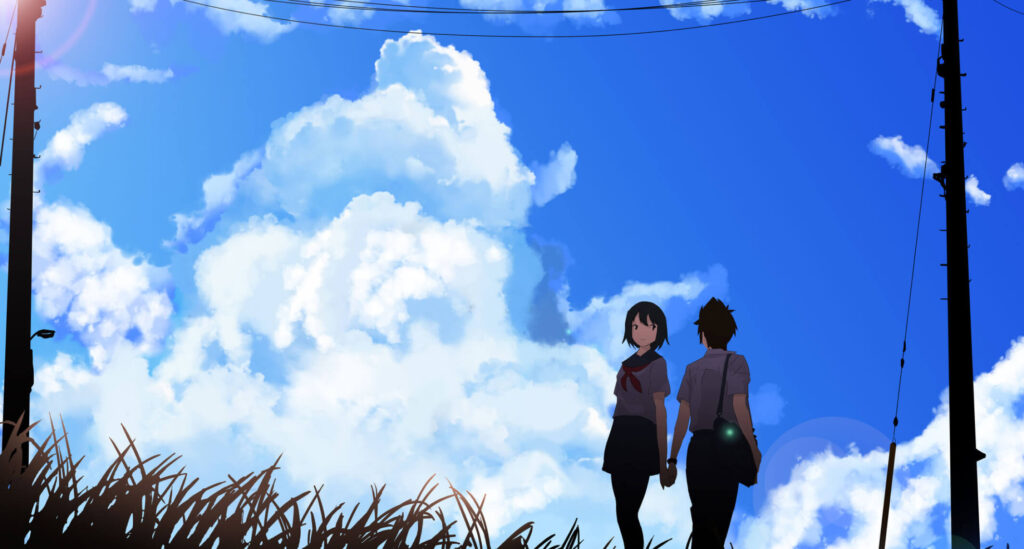
How to Draw Stunning Anime Clouds
Learn to draw anime-style clouds with this easy, step-by-step cloud tutorial. You’ll pick up tips on shapes, color, and composition—plus get free cloud brushes to use in your own art.
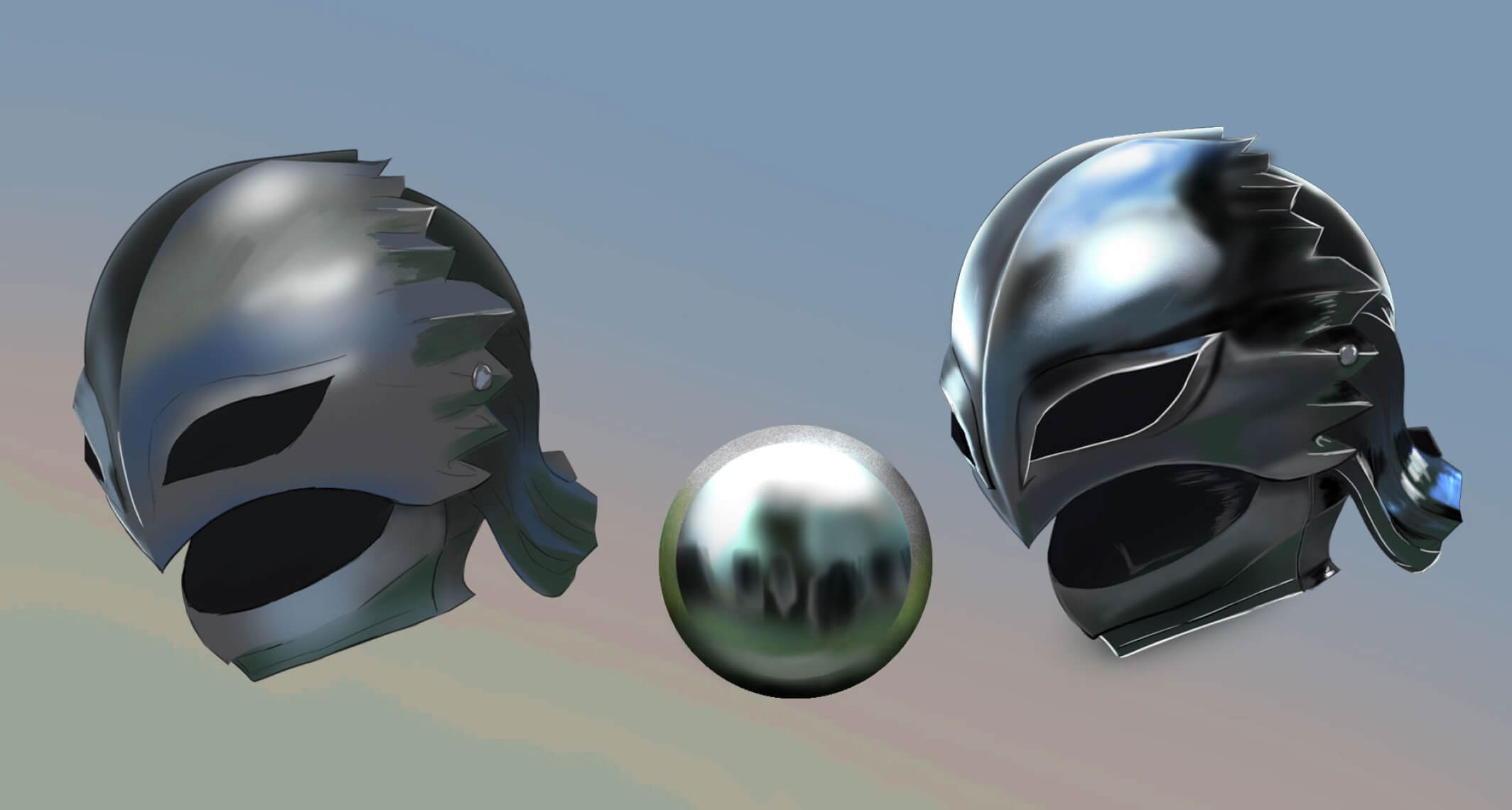
How to Paint Realistic Metal
Learn how to paint realistic metal with this step-by-step guide. From base colors to to lighting and reflections, get practical tips for your artwork shine, literally.
Digital Canvas Sizes Made Easy: 6 Smart Tips for Artists
Confused about what canvas size or DPI to use? This beginner-friendly guide breaks down digital canvas sizes, resolution tips, and print dimensions—so you can create with confidence.