
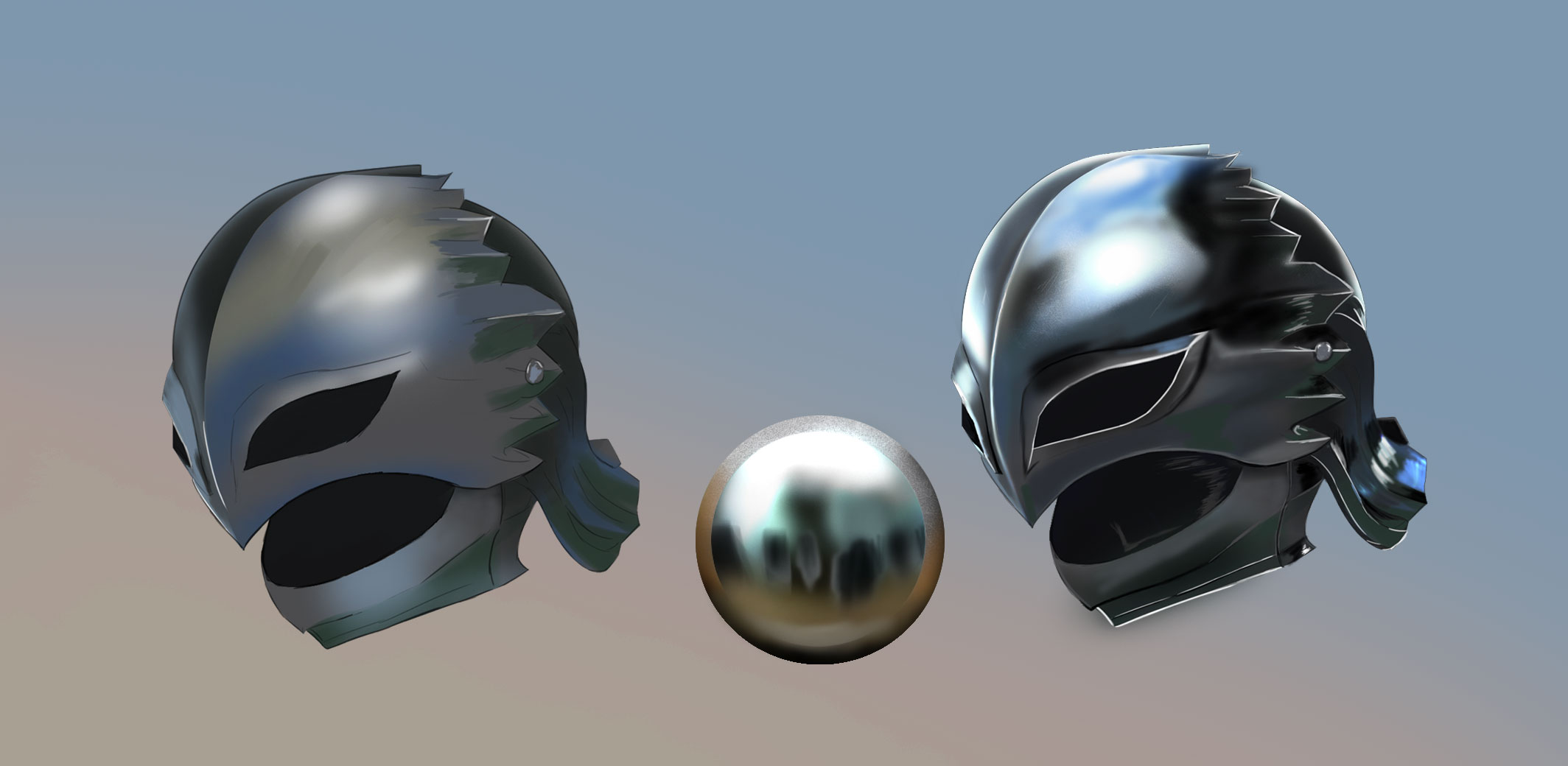
By:
Metal is one of the most satisfying materials to paint well — and one of the most confusing to learn. Unlike skin or fabric, where the rules feel intuitive, metal behaves in ways that seem almost backwards at first. The shadows can be lighter than the midtones. The highlights are impossibly sharp. The surface reflects colors from across the scene that have nothing to do with the object itself.
Once you understand why metal behaves this way, it starts making sense — and painting it goes from guesswork to a reproducible process you can apply to any metal surface in any scene.
This guide covers everything: the core physics of how metal reflects light, the complete step-by-step painting process, how to paint six different metal types (steel, gold, copper, bronze, silver, and rusted iron), how to handle scratches and wear, how to paint metal in anime and stylized art, layer setup in Clip Studio Paint and Procreate, and a full FAQ. Work through it on a simple metal shape first — a sphere or cylinder — before applying it to complex armor or weapons.
📌 What you’ll need:
Any digital art software with layers — Clip Studio Paint, Procreate, Krita, or Photoshop all work. The techniques in this guide apply to all of them. A basic round brush (hard and soft variants) and a texture brush are the only tools required.
Part 1 — Why Metal Looks the Way It Does
Before touching a brush, you need to understand one fundamental thing about metal that separates it from every other material: metal doesn’t have its own color in the way that wood, skin, or fabric do. It borrows its color from its environment.
A red apple is red because its surface absorbs most wavelengths of light and reflects back only red. A piece of polished steel doesn’t absorb much light at all — it reflects almost everything that hits it. What you see on the surface of polished steel is essentially a distorted mirror of the world around it: the sky above, the ground below, nearby objects to the sides, and the light sources in the scene.
This has two major practical implications for painting metal:
- Metal has extreme value contrast. The highlights are very bright (close to pure white on polished surfaces) and the shadows can be very dark — often darker than the surrounding environment, because metal shadows reflect the dark sky or floor rather than scattering ambient light the way matte surfaces do. The range from darkest dark to brightest bright on a metal surface is much wider than on a matte surface.
- Metal has sharp, hard-edged transitions. Because metal reflects specific light sources and specific parts of the environment, the transitions between light and shadow on metal are much harder and more abrupt than on soft materials. A fabric shadow fades gradually; a metal shadow can shift from very bright to very dark in just a few pixels.
The Reflectivity Spectrum
Not all metals are equally reflective. Think of metal as sitting on a spectrum from highly polished mirror-like surfaces to rough matte surfaces:
| Surface Type | Reflectivity | Highlight Quality | Shadow Quality | Examples |
|---|---|---|---|---|
| Polished/Mirror metal | Very high | Very sharp, very bright | Very dark, sharp edges | Chrome, polished silver, mirror steel |
| Smooth metal | High | Sharp, bright | Dark, fairly sharp | New steel, brushed aluminum, clean armor |
| Semi-matte metal | Medium | Wider, slightly softer | Medium dark, softer edges | Aged steel, pewter, iron |
| Rough/Matte metal | Low | Wide and diffuse | Lighter and softer | Rusted iron, raw cast metal, heavily worn metal |
Understanding where your specific metal falls on this spectrum determines every other painting decision — how sharp to make your highlights, how dark to push your shadows, how hard-edged to make the transitions.
The Environment Color Rule
Since metal reflects its environment, the colors you paint on a metal surface should borrow from what’s in the scene around it. A sword held outdoors under a blue sky will have blue-tinted shadows (reflecting the sky) and warm-tinted highlights (reflecting sunlight). The same sword in a dungeon with torchlight will have warm orange shadows (reflecting the stone walls and torchlight) and bright warm highlights. The metal itself hasn’t changed — the environment has.
This is why painting metal from imagination without thinking about the scene is so hard. The metal’s appearance is inseparable from where it exists.
💡 The most useful mental model:Paint metal like you’re painting a stretched, distorted mirror. The top of the object reflects the sky (light area). The bottom of the object reflects the ground (usually darker). The sides reflect whatever is nearby. The very brightest point is the direct light source reflection. Everything else is the environment.
Part 2 — The Complete Step-by-Step Process
This is the core workflow I use for painting any metal surface — from a simple sword blade to complex plate armor. Work through it on a sphere or cylinder first to build the muscle memory before applying it to complex shapes.
Step 1 — Lower Your Sketch and Set Up Layers
Reduce the opacity of your sketch layer to about 20–30% so it’s visible as a guide but doesn’t interfere with your color work. Set up your layer stack from bottom to top: Background color → Base color layer → Shadow layers (Multiply) → Highlight layers (Screen or Add) → Reflection details → Sketch layer (at top, low opacity) → Final linework (if using).
Having this structure in place before you start painting prevents the layer chaos that makes complex paintings hard to edit later.
Step 2 — Block In the Base Color

Fill the metal shape with a flat base color — this is the mid-tone of the metal, the color it would be in perfectly neutral, diffuse lighting. For each metal type, this base color is different:
- Steel / Iron: Cool mid-grey (around #8a8e96)
- Gold: Warm golden yellow (around #c8a84b)
- Copper: Warm reddish-orange (around #b87333)
- Bronze: Brown-gold (around #8c7038)
- Silver: Light cool grey (around #a0a4b0)
- Rusted iron: Warm red-brown (around #7a3e2a)
This base color should be a mid-tone — not your lightest light or darkest dark. Everything else is built on top of it. Keep it as a single flat fill for now.
Step 3 — Paint the Dark Zones (Multiply Layer)
On a new layer set to Multiply blend mode, paint the shadow areas of your metal. This is where metal differs most from other materials — the dark areas on metal are often very dark, very abruptly transitioning, and can include tones influenced by the environment (a blue sky reflecting in the lower shadow band, for example).
Use a hard round brush for most of this work. Keep edges sharp — especially where the shadow meets a highlight or a light-facing surface. Soften only where the form gradually curves away from the light source (not at abrupt edges or reflected light boundaries).
The shadow color should be a darker, cooler version of your base color — never just a darker version of the same hue. For steel, push the shadows toward a blue-grey or blue-black. For gold, push shadows toward a dark brown or deep warm grey.
Step 4 — Add the Reflected Light Band
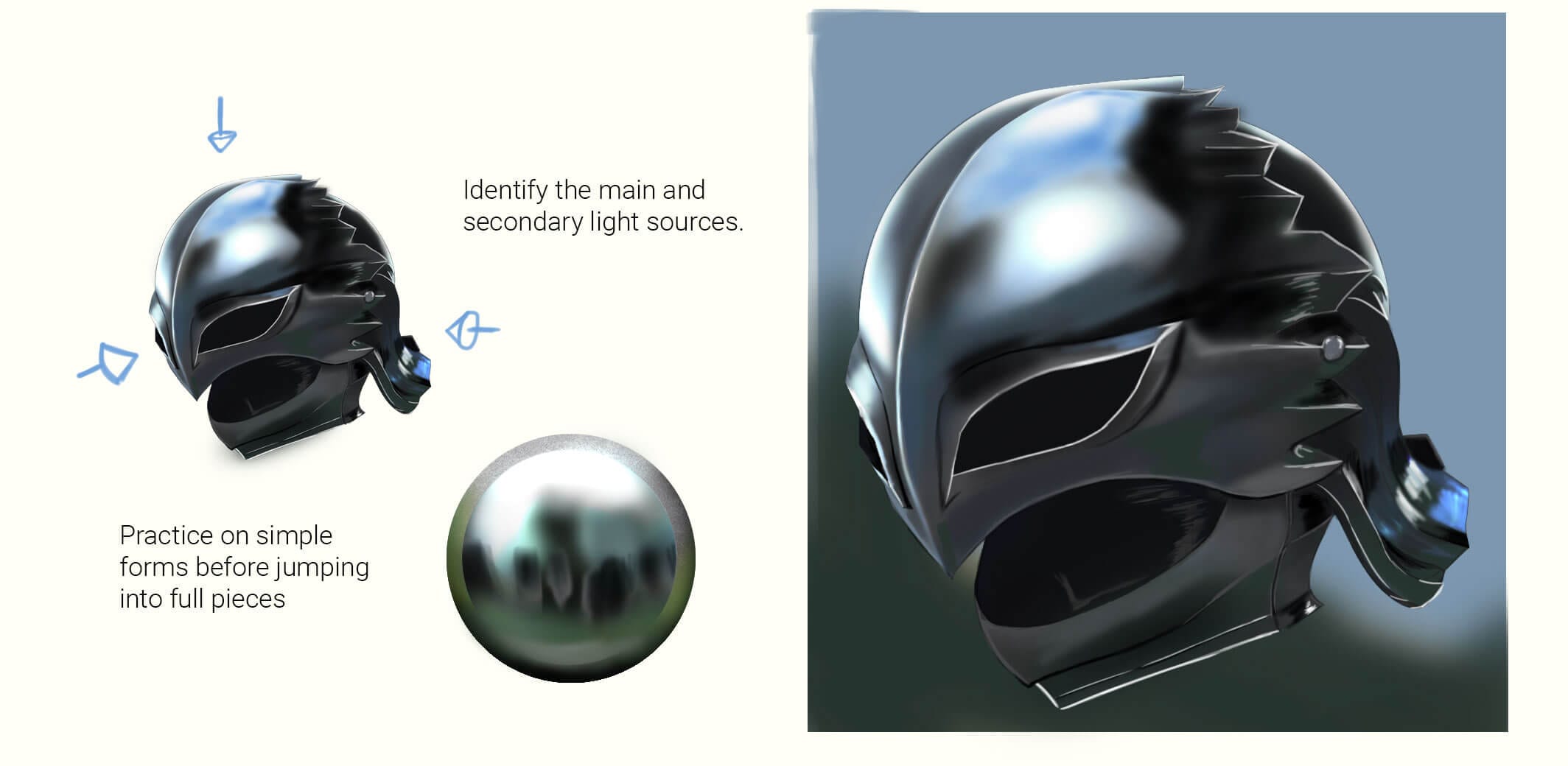
One of the most characteristic and important elements of metal shading is the reflected light band — a strip of lighter value at the very bottom of the shadow area, where the metal is reflecting the ground or nearby surfaces. On non-metal objects, this reflected light is subtle. On polished metal, it can be almost as bright as the main highlight.
Paint a band of lighter, often slightly different-hued color along the bottom edge of the shadow zone or along the lower silhouette edge of the metal object. This band is what makes metal look like it’s sitting in a real environment rather than existing in a vacuum. On a sword blade, this might be a strip of warm ground-reflected color along the lower edge. On a helmet, it might be a lighter zone along the bottom rim.
Step 5 — Paint the Primary Highlight
On a new layer set to Screen or Add blend mode (or Normal at high opacity with a near-white color), paint the primary highlight — the reflection of the main light source. On polished metal, this is:
- Very bright — close to pure white on highly polished surfaces
- Very sharp-edged — the transition from highlight to shadow is abrupt, not gradual
- Narrow — a thin stripe or small shape, not a broad soft glow
- Linear on flat or cylindrical surfaces — following the edge or the curve of the form
Use a hard round brush for the primary highlight. Start with a confident single stroke. You can soften one edge slightly (the edge facing away from the light source) while keeping the edge facing the light source very sharp.
Step 6 — Add Secondary Highlights and Light Edges
Metal surfaces often have multiple light sources or multiple faces at different angles to the primary light — each producing its own highlight. Add secondary highlights on faces or edges that catch the light at a slightly different angle than the primary. These are slightly dimmer and narrower than the primary highlight.
Edge highlights are particularly important for weapons and armor: a thin, bright line along the sharpened edge of a blade or along the rim of a helmet reads immediately as polished, sharp metal. Use a very small hard brush or even the line tool in your software to paint these edge highlights precisely.
Step 7 — Paint Reflections of the Environment
This is the step that truly sells the illusion. On a new Normal layer at reduced opacity (30–60%), use a small brush to paint simplified reflections of the surrounding environment onto the metal surface. This doesn’t mean painting detailed scenes — it means hinting at them:
- A faint warm orange-brown in the lower portion of a sword blade (reflecting the ground or wooden floor)
- A slight blue-green in the upper portion of armor (reflecting the sky or foliage)
- A warm orange stripe on the side of a shield (reflecting torchlight from nearby)
Keep these environment reflections subtle and slightly out-of-focus (use a soft brush, or add a slight blur). If they’re too sharp or too saturated, they’ll read as intentional decoration rather than natural reflection.
Step 8 — Add Texture Details (Scratches, Wear, Surface Imperfections)
Few metal surfaces in a character’s world are perfectly clean and unmarked. Scratches, dents, oxidation patches, and wear marks add history and believability to metal. On a new layer at Normal blend mode:
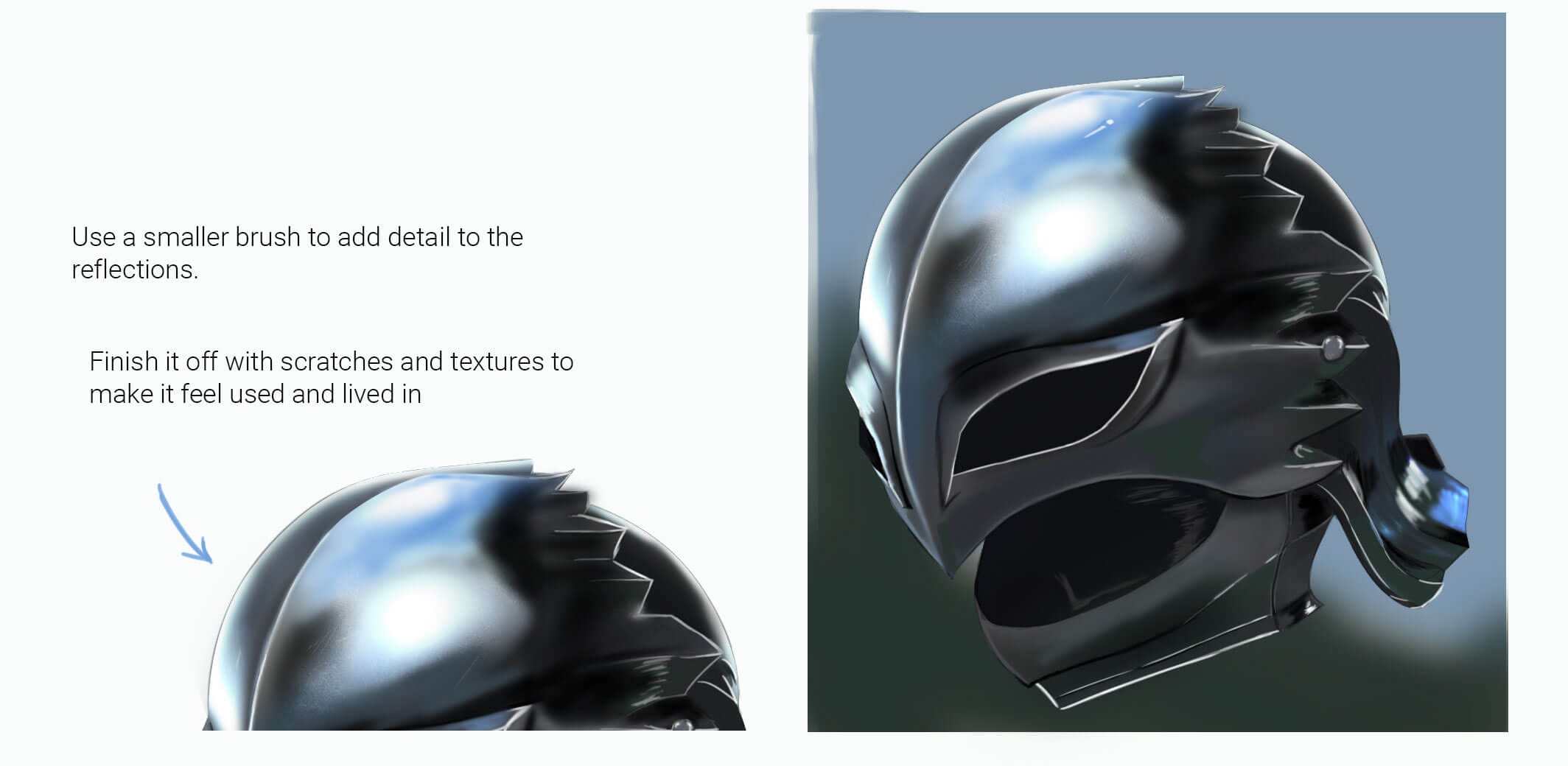
- Scratches: Use a small hard brush to paint thin, slightly irregular lines. Each scratch has a bright side (the wall of the scratch facing the light) and a dark side (the wall facing away). These two parallel lines — one light, one dark — are what make a scratch read as a 3D groove in the surface rather than just a mark.
- Dents: A dented area has its own micro-light-and-shadow structure — the raised rim of the dent catches light; the depression inside falls into shadow.
- Oxidation or discoloration: Use a soft brush at very low opacity to add subtle warm or cool tint patches where the metal has oxidized, been heated, or been exposed to different conditions.
Less is more with texture details. A few well-placed scratches that follow a logical narrative (battle damage on a warrior’s armor, wear marks where a sword has been gripped) are more convincing than a random scatter of marks. Every scratch and dent should tell part of the object’s story.
Step 9 — Final Refinement and Color Adjustment
Step back and evaluate the overall piece. Create a new layer at the top set to Color or Overlay blend mode and use it to make final color adjustments — pushing the overall tone warmer or cooler, adding a subtle color cast that unifies the metal with the rest of the scene. Check that your darkest shadows are dark enough and your brightest highlights are bright enough — the value contrast is often what separates convincing metal from flat-looking metal. If in doubt, push both further than feels comfortable.
Part 3 — Painting Six Different Metal Types
The process above applies to all metals. What changes between different metals is the base color, the color temperature of highlights and shadows, the reflectivity level, and the specific environmental colors that tend to appear in the reflections.
⚔️ Steel / Iron (The Foundation Metal)
Base color: Cool mid-grey (#8a8e96 or similar)
Highlight color: Near-white, very slightly warm or neutral
Shadow color: Blue-grey to near-black
Reflectivity: High (polished) to medium (worn)
Steel is the most versatile and most commonly painted metal in fantasy and anime art — swords, armor, helmets, chains. The key characteristic of steel is its cool, neutral tone and very high value contrast. The highlights are almost white; the shadows can be nearly black. The transition between them is abrupt.
Key technique: The sharpness of the highlight edge is what communicates how polished the steel is. A freshly forged, polished sword has a razor-sharp highlight edge with almost no transition zone. A worn, aged blade has a slightly softer, wider highlight with more visible texture in the surface.
Environment colors to use: Blue from sky reflection in upper shadow zones, warm tan or brown in lower reflected light band. In interior scenes, warm orange-yellow from torchlight or candlelight.
🏆 Gold
Base color: Warm golden yellow (#c8a84b or similar)
Highlight color: Bright, slightly warm yellow-white
Shadow color: Deep warm brown, almost dark orange-brown
Reflectivity: Very high
Gold is a highly reflective warm metal with a distinctive color that persists even in reflection — unlike steel, which loses its base color in highlights and shadows, gold retains a warm golden tint throughout its value range. The shadows of gold are warm brown, not cool grey.
Key technique: Paint gold with three distinct value bands: a dark warm-brown shadow zone, a mid-tone golden yellow base, and a very bright near-white highlight. The transitions between these bands should be relatively sharp — gold is highly polished in most fantasy depictions. Avoid making gold look yellow all over; the value contrast is what makes it read as metallic rather than painted yellow.
Common mistake: Using an orange highlight instead of a near-white highlight. Gold’s primary highlight should be very bright — close to white — not orange. The warm orange tones belong in the mid-tone and reflected light zones, not the brightest point.
🔶 Copper
Base color: Warm reddish-orange (#b87333 or similar)
Highlight color: Bright, slightly pinkish-white or warm white
Shadow color: Deep red-brown, pushing toward near-black
Reflectivity: High (polished) to medium
Copper has the most distinctive and saturated base color of common metals — a warm, reddish-orange that makes it immediately recognizable. Fresh copper is bright and vivid. Aged copper develops a characteristic blue-green patina (verdigris) in recesses and weathered areas.
Key technique: For new copper, maintain high saturation in the mid-tones and push the shadows toward a deep brick red or maroon. For aged copper, paint the patina as a separate layer on top of the base metal — use blue-green at very low opacity in recessed areas and shadow zones, as if corrosion has accumulated there (because it has). The contrast between the bright copper surfaces and the dull blue-green patina in the crevices is visually striking and immediately readable.
🏛️ Bronze
Base color: Brown-gold (#8c7038 or similar, more muted than gold)
Highlight color: Warm near-white or pale gold
Shadow color: Deep warm brown to dark olive-brown
Reflectivity: Medium — less reflective than gold or steel
Bronze is older and more muted than gold — it has a warm, slightly brownish-golden quality that reads as heavy and ancient. Like copper, aged bronze develops patina — but bronze patina tends toward darker green-grey rather than copper’s bright blue-green.
Key technique: Keep the saturation lower and the value contrast slightly less extreme than gold. Bronze doesn’t shine as aggressively as polished gold — it has a more dignified, muted luster. Historical or ancient bronze (on ruins, old artifacts, worn statues) benefits from subtle texture across the surface to suggest weathering, and patina painted into crevices and recessed areas.
🌕 Silver
Base color: Light cool grey (#a0a4b0 or similar, lighter than steel)
Highlight color: Pure or near-pure white
Shadow color: Cool blue-grey to medium-dark grey
Reflectivity: Very high — among the most reflective metals
Silver is similar to steel but lighter in overall value and slightly cooler. It’s among the most reflective of metals and tends to produce cleaner, brighter highlights than steel. The distinction between silver and steel is subtle — primarily in the base tone (silver is lighter) and the highlight brightness (silver goes brighter).
Key technique: The base mid-tone of silver should be noticeably lighter than steel — if steel is a mid-grey, silver is a light grey. Push the highlight to near-pure white, and make the shadow zone cooler and bluer than you might for steel. Silver in fantasy contexts (particularly in anime) is often depicted as slightly magical or ethereal — adding a very subtle cool blue-tinted secondary glow around highlights reinforces this quality.
🦀 Rusted Iron / Aged Metal
Base color: Warm red-brown (#7a3e2a or similar)
Highlight color: Muted warm tan or dull orange-brown
Shadow color: Deep dark brown to near-black
Reflectivity: Very low — rust is matte and light-scattering
Rusted metal is the inverse of polished metal in almost every way: low reflectivity, soft highlights, rough texture, and complex surface variation. It reads as heavy, worn, and decayed — which makes it visually interesting and narratively rich in character design.
Key technique: Use a texture brush throughout. The rust surface should show visible granularity — stippled, rough marks rather than smooth gradients. Work in multiple layers of warm red-brown, dark brown, and orange-tan, building up the varied texture of the rusted surface. Active rust (bright orange-red) sits on top of older darker rust and bare corroded iron underneath. Add flaking and pitting texture by using a stipple brush at varying opacities. The highlights on rusted metal are wide, soft, and dull — nothing like the sharp lines of polished steel.
Adding remaining clean metal: No object is ever entirely uniformly rusted. Edges and high-contact areas may show glimpses of surviving cleaner metal underneath. A thin strip of slightly more reflective grey-brown along a worn edge suggests the material is still iron beneath the surface corrosion.
Part 4 — Painting Metal in Anime and Stylized Art
The realistic metal process above applies to painterly illustration styles. But many artists working in anime or manga-influenced styles want a version that’s cleaner, more graphic, and faster to produce — without sacrificing the visual impact of convincing metal.
Cel-Shaded Metal (Anime Style)
Anime metal uses the same underlying logic as realistic metal — high contrast, sharp highlights, environment color in reflections — but executes it with flat, hard-edged shapes rather than blended gradients. The result looks deliberate and graphic rather than painted, which suits the anime aesthetic perfectly.
The cel-shading approach for metal:
- Base color — flat fill, same as the realistic approach
- Shadow shape — a flat hard-edged shape painted on a Multiply layer. No blending. The edge between shadow and base is perfectly crisp.
- Reflected light band — a second flat shape at the edge of the shadow, slightly lighter than the base. Again, hard edges.
- Primary highlight — a thin, bright, hard-edged stripe on a Screen or Add layer. Often pure white or near-white. This single line is what makes cel-shaded metal immediately read as metallic.
- Secondary highlight — optional; a second, slightly wider and dimmer bright stripe adjacent to the primary.
The key to convincing anime metal is making the highlight thin, bright, and hard-edged. A broad, soft highlight reads as plastic or rubber. A thin, white, crisp line reads as steel immediately — even without any other shading at all.
NMM — Non-Metallic Metal
Non-Metallic Metal (NMM) is a technique originally developed in miniature painting where the illusion of metal is created entirely using matte paint — no metallic or reflective medium involved. In digital art, it refers to rendering metal using only standard brushes without any special effects, creating the illusion of reflectivity through careful value and color work alone.
NMM is the most technically demanding approach to painting metal and produces the most dramatic, illustrative results. The technique pushes value contrast to the extreme — much higher than what looks “natural” — and uses very deliberate environment color placement that tells a clear story about where the metal exists in the scene. Many of the most impressive weapon and armor illustrations you’ll see are executed in NMM style.
The key principles of NMM in digital art are identical to the realistic approach above, but executed with more confidence and more exaggeration: darker darks, brighter lights, sharper transitions, and more deliberate color temperature variation between different zones of the surface.
Part 5 — Layer Setup Reference
Here’s the exact layer structure I use for painting metal in Clip Studio Paint. The same structure works in any software that supports blend modes.
| Layer Name | Blend Mode | Opacity | Purpose |
|---|---|---|---|
| Linework / Sketch | Normal | 20–100% | Structural guide; reduce to low opacity during painting |
| Color Adjustment | Color or Overlay | 10–30% | Final overall color correction and tonal unification |
| Scratch / Texture Details | Normal | 50–80% | Scratches, dents, surface imperfections |
| Environment Reflections | Normal | 30–60% | Subtle color hints from surroundings painted onto surface |
| Secondary Highlights | Screen or Add | 50–70% | Edge highlights, secondary light faces |
| Primary Highlight | Screen or Add | 80–100% | Main light source reflection — sharp, bright, narrow |
| Reflected Light Band | Normal or Screen | 40–60% | Ground/environment reflection at lower shadow edge |
| Shadow Layer 2 | Multiply | 40–70% | Deeper occlusion shadows in crevices |
| Shadow Layer 1 | Multiply | 50–80% | Main shadow shapes |
| Base Color | Normal | 100% | Flat base metal color fill |
| Background | Normal | 100% | Scene background color |
In Procreate, the same structure applies — use the blend mode options in the layer settings panel to set each layer to Multiply, Screen, or Add as indicated. Procreate’s “Luminosity” blend mode is a useful alternative to Screen for highlights that need to retain color information.
Part 6 — Color Palettes for Each Metal Type
| Metal | Deep Shadow | Shadow | Base / Mid-tone | Reflected Light | Highlight |
|---|---|---|---|---|---|
| Steel | #1a1e2a | #3a4055 | #8a8e96 | #c0c8d8 | #f0f4ff |
| Gold | #3a2010 | #6b4820 | #c8a84b | #e8c870 | #fff8e0 |
| Copper | #3a1a10 | #7a3020 | #b87333 | #d89050 | #ffe8d0 |
| Bronze | #2a1c08 | #503810 | #8c7038 | #b89050 | #f0dca0 |
| Silver | #202530 | #505870 | #a0a4b0 | #d0d8e8 | #ffffff |
| Rusted Iron | #200c08 | #4a1e10 | #7a3e2a | #a06040 | #c09060 |
These are starting points, not rules. Adjust these colors to match the specific lighting and environment of your scene. The single most important adjustment: always shift your shadow colors cooler or warmer to reflect the environmental light — never just darken the base color straight down.
Part 7 — Common Mistakes and How to Fix Them
❌ Metal looks like plastic or rubber instead of metal
✅ Fix: The highlight is too soft, too broad, or not bright enough. Metal highlights should be very sharp-edged and very bright — close to pure white on polished surfaces. Narrow the highlight, harden its edges, and push its brightness up. Also check that your shadow values are dark enough — plastic and metal can look similar when both are painted with moderate value ranges, but metal needs a wider, more extreme value contrast.
❌ The metal looks flat and floating — not part of the scene
✅ Fix: The environment reflections are missing or too subtle. Add color from the surrounding scene into the metal surface — even a hint of warm ground color in the lower shadow band, or blue sky color in the upper area, grounds the metal in its environment immediately. Metal that doesn’t reflect its surroundings looks like it exists in a vacuum.
❌ Gold looks like it’s painted yellow, not metallic
✅ Fix: The highlight isn’t bright enough and the shadow isn’t dark enough. Gold’s highlights should approach near-white, not stay orange or yellow. Push the brightest point much lighter than feels comfortable. Also push the shadow zone deeper into a dark warm brown — the value contrast between dark brown shadow and near-white highlight is what reads as metallic gold rather than yellow paint.
❌ Scratches look like flat marks drawn on top of the surface
✅ Fix: Each scratch needs both a light side and a dark side — two parallel strokes, one slightly brighter than the surface and one slightly darker, right next to each other. The light line is the wall of the scratch groove facing the light source; the dark line is the wall facing away. Without both lines, the scratch reads as a 2D mark. With both, it reads as a 3D groove in the surface.
❌ All the metals in the scene look the same
✅ Fix: Differentiate through base color, reflectivity level, and highlight quality. Steel and silver both look grey, but steel is darker in its base mid-tone, slightly warmer, and its highlights can be slightly less pure-white than silver. Gold and bronze are both warm metals, but gold is more saturated and more reflective — its highlights go brighter and its shadows go deeper. Study real reference photos of different metals side by side and identify the specific differences in each.
❌ Rusted metal looks like painted brown, not corroded iron
✅ Fix: Rust needs texture — the smooth, blended painting approach used for polished metal actively works against rust. Switch to a stipple or texture brush and build up the rust surface with varied, granular marks in multiple warm tones (bright orange-red, mid red-brown, dark brown). Add flaking texture by painting lighter patches with irregular, chipped edges over the darker base. The visual complexity of overlapping texture layers is what reads as authentic corrosion.
Part 8 — Painting Metal Practice Plan
Metal is a skill best built through dedicated practice on isolated forms before applying it to full character illustrations. Here’s a structured approach:
| Week | Exercise | Focus | Time |
|---|---|---|---|
| Week 1 | Paint a steel sphere from scratch, 5 times | Master the basic value structure: dark shadow, base, reflected light, sharp highlight | 45 min/session |
| Week 2 | Paint the same sphere in gold, copper, and silver | Understand how base color and reflectivity change between metal types | 45 min/session |
| Week 3 | Paint a sword or dagger blade | Apply the metal technique to a flat, angled surface. Practice edge highlights on the blade. | 60 min/session |
| Week 4 | Paint a simple piece of armor (pauldron or chestplate) | Complex curved surfaces, multiple metal faces at different angles, environment reflections | 60–90 min |
| Week 5 | Paint rusted metal | Low-reflectivity metal using texture brushes, layered warm tones, flaking effects | 60 min |
| Week 6 | Paint a full weapon or armor piece on a character | Integrating metal into a full character illustration — matching light sources across all elements | 90–120 min |
| Ongoing | Paint metal from photo reference | Study real metal objects — kitchen utensils, tools, jewelry — and paint them from life. Real reference teaches faster than any guide. | 30 min/week |
💡 The single most useful practice habit for metal:Gather real metal objects — a spoon, a knife blade, a piece of foil, a coin — and observe them under different lighting conditions. Notice how the highlights shift as you move the light source. Notice how the reflections change as you hold the object near different colored surfaces. Watch the reflected light band appear at the lower edge when you hold the object near a white surface. Ten minutes of careful observation with a real metal object teaches more than an hour of painting without reference.
Frequently Asked Questions
What’s the most important thing to get right when painting metal?
Value contrast. The single biggest difference between metal that looks convincing and metal that looks like plastic or painted flat is the range from darkest dark to brightest bright. Metal has extreme value contrast — highlights that go very close to pure white and shadows that go very dark. Most beginners paint metal with too narrow a value range — everything stays in the mid-tones and nothing reads as reflective. Push your highlights brighter and your shadows darker than feels comfortable, and the metallic quality will emerge even if other elements aren’t perfect yet.
How do I choose the right colors for metal shadows?
Never just darken the base color. Metal shadows should shift in hue as well as value — typically moving cooler (toward blue or blue-grey) for most metals under daylight lighting, or warmer (toward warm brown) for metals under artificial or firelight. For steel in daylight, the shadow should have a bluish-grey quality from the sky reflecting in it. For gold in the same scene, the shadow is a warm deep brown rather than a darker orange. The key principle: think about what’s around and above the metal object, and push the shadow color toward what that environment would reflect into the shadowed area.
How do I paint metal highlights without them looking like white scribbles?
Three things need to be right for a highlight to read as metal rather than as a mistake: it needs to be in the right position (where the light source would logically reflect), it needs to follow the form (a highlight on a curved blade follows the curve; a highlight on a flat plate is straighter), and it needs to have the right edge quality (sharp on the light-source side, possibly slightly softer on the shadow side for curved surfaces). Paint highlights with confident single strokes rather than building them up from multiple uncertain marks — hesitation shows in highlights more than anywhere else in metal painting.
Should I use the Add or Screen blend mode for highlights?
Both work, but they behave differently. Screen blend mode brightens the layer beneath it without going past pure white — it’s a softer, more controlled brightening. Add blend mode adds the layer’s pixel values directly to those beneath it, which can produce very intense brightness and color saturation effects — great for magical glows or very hot light sources, but easier to overdo. For most metal highlights, Screen is the safer starting point. Use Add when you want a particularly intense, almost luminous highlight — on a magically charged sword, for example, or on highly polished chrome under direct sunlight.
How do I paint gold without it looking orange or yellow?
The base mid-tone of gold should be a warm yellow-gold — that’s correct. The problem is usually that the highlights stay too orange or yellow instead of pushing toward near-white. Gold’s brightest highlight should be almost white with just a very slight warm tint — not orange. Meanwhile, the shadows should go deep into a warm dark brown. It’s this combination — dark warm brown shadows, golden mid-tone, near-white highlights — that reads as metallic gold. If the entire value range stays in the yellow-orange band, it reads as yellow paint. The extreme values at both ends are what create the metallic reading.
How many scratches and details should I add to metal?
Significantly fewer than you think. Scratches and surface details should be used to tell a story about the object, not to fill the surface with marks. A warrior’s battle-worn sword might have 5–10 significant scratches along the blade, concentrated in the areas that would logically receive impact. A ceremonial sword that’s rarely used might have almost none. Too many random scratches creates visual noise rather than believable wear — the eye can’t read any individual detail and the whole surface reads as texture rather than history. Ask yourself what would cause each scratch before painting it, and only include scratches that have a believable cause.
Can I use the same metal technique in traditional (non-digital) media?
Yes — the same principles apply, though the execution tools differ. In traditional media: use gouache or acrylic for cel-shaded anime metal (flat, opaque applications with clean edges); use graphite for detailed pencil metal studies (the natural range of graphite values maps well to metal’s value contrast); use watercolor for looser, more painterly metal effects (layering washes builds up value gradually, but achieving the hard-edged highlights requires masking fluid or careful negative painting). The layer-based workflow doesn’t translate directly, but the same planning — base color, shadows, reflected light band, highlight — maps to working from dark to light in traditional opaque media, or light to dark in watercolor.
How do I paint the difference between new and old metal?
New/polished metal: high reflectivity, sharp highlights, high value contrast, minimal texture, clean colors. Old/aged metal: lower reflectivity, softer and broader highlights, more surface texture and color variation, patina in recesses (blue-green for copper/bronze, orange-brown for iron), scratches and dents accumulated over time. The transition from “new” to “old” metal is essentially a progression of: reducing highlight sharpness, reducing value contrast, adding surface texture, adding patina color in crevices, and adding wear marks. Each step moves the metal further down the reflectivity spectrum from polished to matte.
How do I paint glowing or magical metal effects?
Start with the standard metal technique, then add: a glow color on a new Add or Screen layer around the edges or along specific areas (runes, engravings, magical markings), inner light sources — if the metal is glowing from within, the highlights shift toward the glow color rather than the external light source, and nearby surfaces on the character catch reflected light from the glowing element. Magical metal often has a slight color cast across its entire surface — a blue tint for ice magic, orange for fire, green for nature or poison — applied as a low-opacity Color or Overlay layer on top of the base metal painting. Keep the metallic value structure intact underneath; the magic effect should feel like it’s overlaid on the metal, not replacing its physical properties.
Why does metal look right when I study reference but wrong when I paint from imagination?
Because when painting from reference, you’re recording what you see. When painting from imagination, you’re reconstructing from your mental model — and most artists’ mental model of metal is incomplete in specific ways: they underestimate how dark the shadows go, how bright and narrow the highlights are, and how much the environment color appears in the reflections. The solution is to study reference closely and specifically — not just to copy it, but to identify the exact value of the darkest shadow and the lightest highlight on the specific metal you’re studying, the exact color of the reflected light band, and the exact width and edge quality of the primary highlight. Once you have these specific values clearly in mind, painting from imagination becomes reconstruction rather than guessing.
What to Learn Next
Metal is one of the most satisfying rendering challenges in digital art — and it connects directly to everything else in character illustration:
- How to Draw Clothing Folds — fabric shading uses similar layer structures and light-source thinking, and armor characters need both skills working together
- Color Theory Made Simple — understanding why metal shadows shift in hue (color temperature) and how to choose environment reflection colors intentionally
- Complete Anime Drawing Guide — the full character drawing roadmap, of which metal rendering is one specialized chapter
- Digital Art for Beginners — if the layer blend modes in this guide were unfamiliar, this covers all the foundational digital art concepts
- Canvas Size for Digital Art — getting your canvas setup right before starting any rendering-heavy piece
Start with a sphere. Paint it as steel five times. Then gold. Then copper. By the time you’ve done those fifteen paintings, metal will stop feeling mysterious and start feeling like a process you own. 🖊
Discover More Posts
Keep exploring stories, insights, and creative notes from my journey as an artist. Check out the latest blog entries and find topics that inspire your own process.
How to Draw Stunning Anime Clouds
Learn to draw anime-style clouds with this easy, step-by-step cloud tutorial. You’ll pick up tips on shapes, color, and composition—plus get free cloud brushes to use in your own art.

How to Draw Clothing Folds: The 6 Essential Types Every Artist Should Know
Learn the 6 main clothing folds to make your fabric drawings more realistic and dynamic
How to Draw Anime Hair: The Ultimate 6 Easy Steps
Learn how to draw anime hair step by step. This beginner-friendly guide covers sketching, shading, highlights, and popular styles for male and female characters. Perfect for artists who want to master flow, volume, and shine in their anime hairstyles.