
By:
Fire is one of those effects that looks impressive in anime and terrifying to draw if you’ve never tried it. When I was starting out, I avoided it entirely — I’d design characters with fire abilities and then conveniently crop the flames out of the frame. Every time. Because I genuinely had no idea how fire worked as a drawn shape, and every attempt came out looking like a lumpy orange blob.
The turning point was realizing fire isn’t random. Anime fire especially follows very specific shape logic — pointed tips, tapered tongues, a clear sense of upward movement and internal flow. Once I understood that structure, the randomness became manageable. It’s not about copying fire exactly as it looks in real life. It’s about building a believable language of shapes that reads as fire in the context of an illustration.
This tutorial covers that language from the beginning: the shape logic, the flow, the layering, and the coloring. We go step by step. By the end, you’ll have a complete method you can apply to anything from a candle flame to a full-body fire aura on a character.
1. Understand How Anime Fire Actually Looks (Before You Draw Anything)
Before touching your pen to paper or stylus to tablet, spend five minutes studying how fire appears in anime you know. Not real-life fire footage — anime fire. The two look very different, and you’re learning to draw the anime version.
Anime fire tends to have a few consistent visual characteristics across most styles:
- Pointed, tapered tips — each flame tongue ends in a sharp point, not a rounded blob
- Curved, flowing edges — the sides of each flame tongue curve rather than go straight up
- Layered depth — there are usually multiple “tongues” of flame sitting in front of and behind each other, not one single mass
- A base that widens — fire is widest at the source and narrows as it rises
- Interior glow — the center of the flame is lighter (often yellow-white) and gets deeper in color (orange, red) toward the edges
💬 From Allard:
The anime that taught me the most about fire was actually Fullmetal Alchemist: Brotherhood—specifically the Flame Alchemy sequences. The fire in those scenes is highly stylized but internally consistent. Each blast has a clearly defined path of dense oxygen, a layered explosion with visible depth, and color that shifts from near-white at the hottest point of ignition to deep orange-red at the expanding edges. That’s the template. Find a scene where Mustang snaps his fingers, pause it, and study the shape language of his tactical explosions before you draw your first line.
What to look for when studying reference:
- Count the individual flame tongues — how many are there? Where does each one start and end?
- Look at the silhouette as a whole shape — what does it look like filled in solid black?
- Notice where the color is lightest and where it’s deepest
- Observe the direction of all the curves — they almost always flow upward and slightly outward from the center
You don’t need to copy what you find. You’re building a mental model of what anime fire looks like before you construct your own version of it.
2. Sketch the Basic Flame Shape — Start with the Silhouette
Begin every fire drawing with the silhouette. Not the details, not the color — the overall mass first. This is the same principle as drawing any character or object: get the shape right before you invest time in anything that sits on top of it.
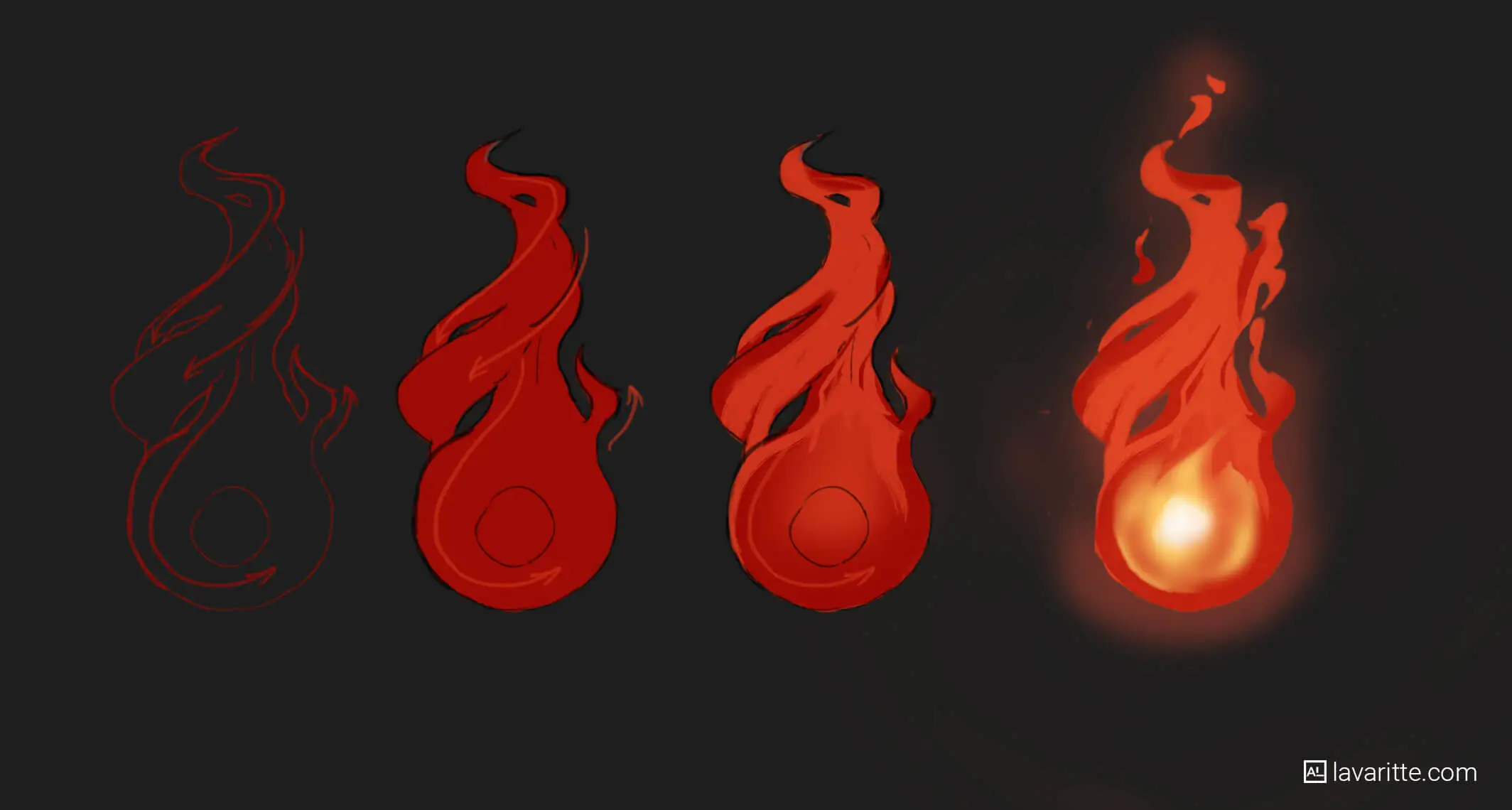
For a basic anime flame, start with a roughly teardrop or torch-shaped mass. Wide at the bottom, tapering to a point at the top. Then break the top edge into two or three pointed tips — uneven, not symmetrical. Real fire isn’t perfectly symmetric, and anime fire that’s too symmetrical looks artificial even within a stylized context.
💬 From Allard:
I always start with a loose, gestural S-curve or C-curve to establish the lean of the flame before I define any shape at all. Fire in motion leans — toward a character, away from impact, in the direction the wind blows. A single flowing curve that captures that lean is the skeleton everything else builds on. Without it, the flame sits static and dead on the page even if the individual shapes are well-drawn.
Step-by-step for your first flame silhouette:
- Draw a single flowing curve (S or C) to establish the direction your flame leans — this is your center axis
- On either side of that axis, draw the outer edge of the flame mass: wide at the base, curving inward as it rises, ending in a point
- Break the top into 2–3 separate pointed tips of different heights — the tallest tip usually sits slightly off-center, not exactly at the middle
- Add 1–2 smaller secondary tongues breaking away from the main mass at the sides or base — these give the fire its lively, moving quality
- Fill the whole shape with a flat mid-tone color (orange or red) and check that it reads clearly as fire before adding any detail
If the filled silhouette doesn’t read as fire, the shape logic isn’t working yet. Fix the shape before you add a single detail line.
3. Add Interior Flow Lines — Draw the Movement Inside the Flame
This is the step that separates flat anime fire from dynamic anime fire. Real fire has internal movement — currents and flows that are visible as lighter and darker streaks within the flame mass. Anime stylizes this into clear, curving lines that suggest the fire is alive and moving.
These interior lines are not random scribbles. They follow the same logic as the outer silhouette: curving upward from the base, narrowing toward the tips, moving in the same general direction as the lean you established in step 2.
| Common Mistake | What to Do Instead |
|---|---|
| Vertical straight lines inside the flame | Curved lines that follow the flow axis you set in step 2 |
| Lines that go to the very edge of the flame | Lines that stay inside the flame and taper to a point before reaching the edge |
| All lines the same thickness | Lines that start thicker at the base and taper thinner as they rise |
| Lines drawn in a different direction from the lean | Lines that all point toward the same general tip as the overall flame |
💬 From Allard:
Think of the interior lines as sub-flames living inside the main flame. Each one has the same shape logic as the whole — pointed tip, curved edges, flowing upward. They’re just smaller and partially hidden behind each other. When I draw them, I’m actually drawing small individual flame shapes rather than abstract lines, and the result looks much more structured and intentional than if I tried to just “add some lines” without thinking about what they represent.
How many interior lines to draw: For a small flame (candle, hand flame), 2–4 interior flow lines is enough. For a large dramatic flame (battle aura, explosion), 6–10, with the larger ones at the base and smaller ones near the tips. Don’t overcrowd. The interior lines are suggestion, not description — the eye fills in the movement if you give it a few confident marks to follow.
4. Layer Your Flame Shapes — Build Depth with Overlapping Tongues
Single-layer fire looks flat. The moment you start layering — drawing multiple flame tongues that overlap and sit at different depths — the fire starts to have dimension and the kind of visual complexity that reads as believable even in a highly stylized context.
Layering is simple in principle: draw a second, slightly smaller flame shape behind the first, and a third smaller one behind that. Each layer is slightly different in shape from the others — same family of curves, but not copies. Vary the tip heights, the width of the base, and the lean direction slightly between layers to keep the fire looking natural rather than stamped.
💬 From Allard:
When I’m doing this digitally in Photoshop, I draw each flame layer on a separate layer and use Multiply blending mode to build the deep shadows where layers overlap, and Color Dodge for the brightest cores. The depth builds itself through the blend modes — I don’t have to hand-paint every shadow and highlight individually. This is one place where working digitally saves a lot of time compared to traditional media, where you’d need to plan the layering more deliberately from the start.
Building layers step by step:
- Draw your main foreground flame (this is the one closest to the viewer and usually the most detailed)
- Behind it and slightly offset — draw a second flame tongue, taller or shorter than the first
- Behind that, a third flame shape, usually the simplest of the three
- At the very back, optionally add a large, soft, almost circular glow mass — this is the radiant light the fire throws, not fire itself
- Where layers overlap, deepen the color — the shadow between two flame tongues should be the darkest red or even dark maroon
Three layers is usually enough for most fire effects. More than five starts to look cluttered unless you’re drawing a very large fire like a building burning or a massive magical attack.
5. Color the Fire — Build from Dark to Light, Not the Other Way Around
Here is the most common coloring mistake beginners make with fire: they start with the bright orange-yellow and try to add dark areas afterward. This produces muddy, desaturated fire that looks more like a bruise than a flame. The correct approach is to build from dark to light — exactly like painting any other subject.
Start with the darkest color in your fire — usually a deep red or red-orange, even going slightly into a dark maroon at the base where layers overlap. Then layer up through orange, into bright yellow, and finally a near-white yellow or pure white at the very hottest core points.
💬 From Allard:
The hottest part of a real flame is actually blue-white at the very center — which is why many anime fire effects, especially on powered-up characters, have a white or blue-white core surrounded by yellow, then orange, then deep red at the outer edges. This is physically accurate even in a stylized form. When I draw a character’s fire attack, I always push the core to near-white or soft blue-white — it reads as hotter, more intense, and more dangerous than orange fire at the center.
The anime fire color sequence (from outside edge to center):
- Outer tips and edges: deep red (#c0392b range) — darkest, most saturated red
- Mid-flame: bright orange (#e67e22 range) — the main body of color
- Inner flame: warm yellow (#f39c12 to #f1c40f range)
- Core: near-white yellow (#fffde7) or pure white
- Optional inner core: pale blue-white for very intense magical fire
Use an Overlay or Color Dodge layer (digitally) for the brightest inner areas — painting them on a standard Normal layer tends to produce a flat, chalky look. Color Dodge creates the luminous quality of actual light rather than just a pale color sitting on top of the flame.
6. Add Embers and Smoke — The Details That Make Fire Feel Alive
Embers and smoke are optional but they transform a finished flame from a solid shape into something that exists in an environment. They’re also much easier to draw than people expect, because they follow simple rules and don’t require precise control.
Embers are just small dots and tiny teardrop shapes that float away from the top and edges of the main flame. They follow the same flow direction as the fire — upward, with a slight curve in whatever direction the flame leans. They start bright orange near the flame and fade to dark red or disappear as they rise. You don’t need many. A dozen well-placed embers reads better than fifty randomly scattered ones.
💬 From Allard:
For smoke in anime fire, I almost always use a large, soft brush set to low opacity — 20–30% — and build up the smoke in multiple passes rather than trying to define it precisely. Smoke has no hard edges. Any attempt to draw it with crisp lines will look wrong. Big, soft, overlapping strokes in a gray that leans slightly warm (not cool gray — fire smoke is warm-toned) and always rising in the same direction as the flame. That’s it. No more complexity needed.
Quick ember technique:
- On a new layer above everything else, use a small hard brush
- Place 8–15 dots of bright orange in a loose arc rising above the flame tip
- Add 3–5 slightly larger teardrop shapes among them — these are bigger embers tumbling in the airflow
- Erase or fade the ones farthest from the flame so they appear to be dying out
- Add a subtle orange glow halo around each ember using a soft brush at low opacity
Tip: if your embers look too organized, add a small random rotation to a few of them. Real embers tumble and spin — perfect horizontal or vertical teardrop shapes look artificial.
7. Draw Fire on a Character — Apply Everything Together
Drawing fire in isolation is different from drawing fire in context. When fire wraps around a character, lives in their hand, or erupts from a weapon, you need to think about how the light from the fire falls on everything near it — and how the character’s body interacts with the flame shape.
The most common beginner mistake when adding fire to a character is drawing the fire as a separate element that happens to be near the character rather than something that exists in the same physical space. The fire should cast light on the character’s face, hands, and clothes. The character’s hand or body should break the fire’s silhouette where it emerges from or wraps around them.
💬 From Allard:
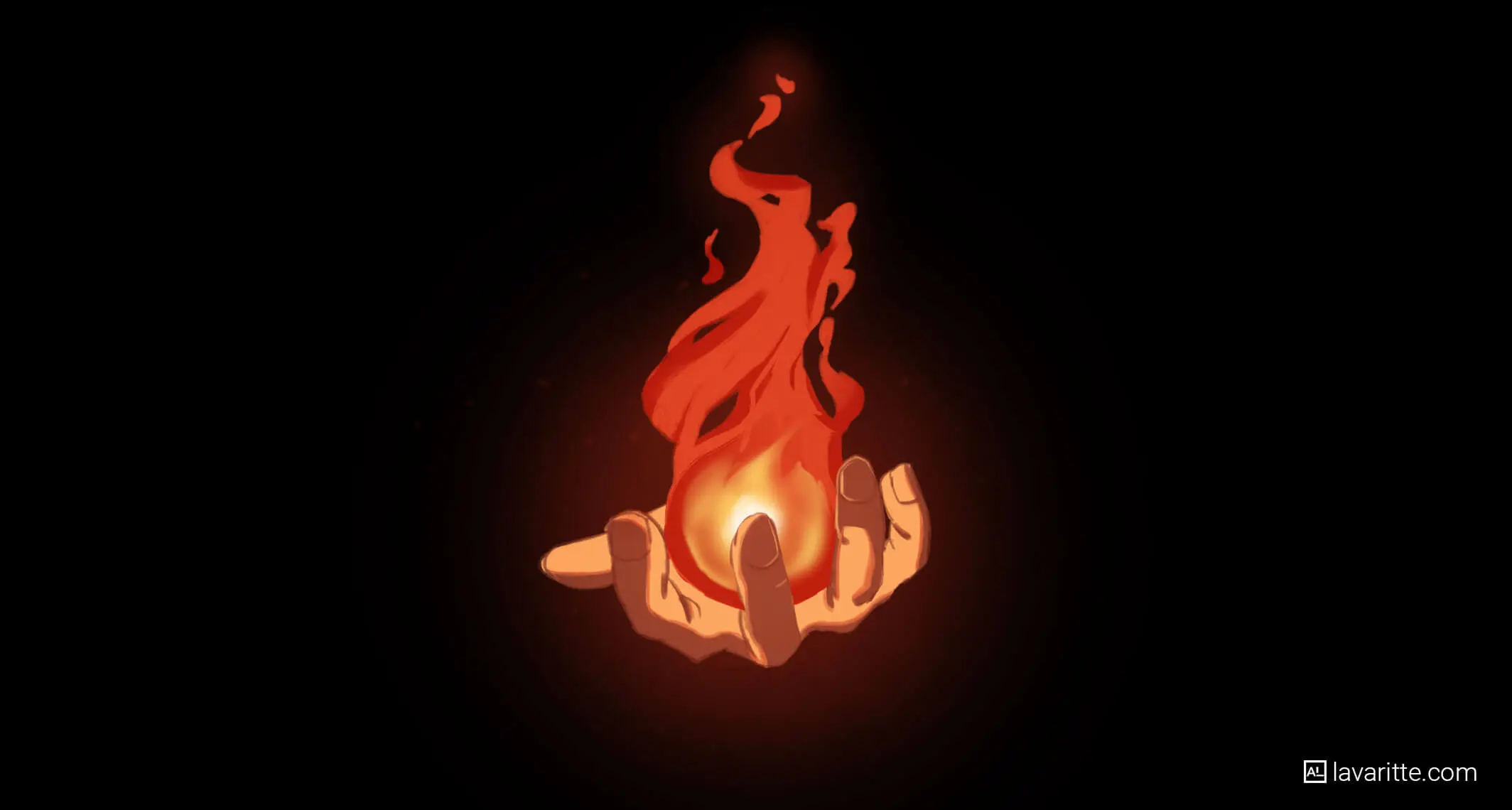
My approach for a character holding fire: I draw the fire first as its own element, then add the character’s hand on top, then go back and add the light the fire casts onto the hand. The light is usually orange on whatever surface faces the flame, fading to the normal skin tone on the surface facing away. That orange rim light is what makes the fire feel like it’s actually in the scene. Without it, the fire could just be a separate sticker pasted on the image.
Fire lighting on a character — what to add:
- Warm orange bounce light on the underside of the face and chin if fire is held at waist or chest level
- Orange rim light on the edge of the hand, forearm, and clothing closest to the flame
- Reflected glow on any metallic surface (armor, weapons) near the fire — this is where Color Dodge shines
- Cast shadow on the opposite side of the character from the fire — the fire is a light source, so everything facing away from it is in shadow
- Slightly warm-tinted shadow everywhere — when fire is the main light source, even the shadows are warmer than neutral gray
This is the step that separates “fire effect pasted onto a character” from “character who is actually standing near fire.” The lighting integration is everything.
The Principles Behind Every Step
Looking at these seven steps together, there’s a consistent logic running through all of them: anime fire is a language of shapes, not a copy of real fire. Every decision — the pointed tips, the curved edges, the layered depth, the dark-to-light color sequence — follows rules that are specific to this visual language. Once you understand the rules, you can apply them to any scale of fire effect, from a candle to a city-consuming inferno.
The biggest mistake beginners make with fire isn’t in the execution — it’s in the approach. They try to draw “fire” from memory or imagination without first understanding what anime fire specifically looks like as a system of shapes. Spend the study time first. Build the silhouette before you add details. Work dark-to-light in your coloring. Integrate the lighting with your character. These aren’t advanced techniques — they’re the basic logic that makes every step work correctly.
Pick one section from this tutorial and practice just that today. The silhouette. The color sequence. The ember technique. One thing, practiced until it feels natural, is worth more than reading seven steps and drawing nothing.
Frequently Asked Questions
What brush should I use to draw anime fire?
For the main flame shapes, a standard hard round brush works well — fire has relatively crisp edges in anime, especially the pointed tips, so a hard brush gives you the control you need. For the inner glow and soft lighting, switch to a soft round brush at low opacity and build up in passes. For embers, hard round again at a small size. If you’re in Clip Studio Paint, the default “G-pen” for line work and the “Airbrush (soft)” for glow effects are a reliable combination. Procreate users typically reach for the “Inking” brush for shapes and “Soft Airbrush” for light effects. You don’t need specialty fire brushes — the shape logic matters more than the brush.
How do I draw fire that looks like it’s moving?
Movement in a still drawing of fire comes from three things: the lean (the overall direction the flame tilts, established by your flow axis before you draw any specific shapes), the asymmetry of your flame tongues (evenly matched tips look static; tips of different heights look alive), and the curve of your interior flow lines (straight interior lines look frozen; curved lines suggest upward flow). You can also suggest movement by making the outermost tips of the flame slightly blurred or faded at the very ends — as if they’re dispersing into smoke — which gives the impression of a flame actively burning rather than a fixed shape.
How do I draw blue or purple anime fire?
The structure and shape logic are identical — only the color palette changes. For blue fire, your color sequence from outside edge to center becomes: deep navy or dark blue at the outer edges, mid-blue in the main body, light cyan in the inner flame, and near-white or pure white at the core. For purple fire (common in supernatural or demonic anime characters), go from deep violet at the edges through bright purple to lavender-white at the center. The color temperature logic still applies — the “hottest” part of the flame is always the lightest, most desaturated color at the core. The darkest, most saturated color sits at the outer edges.
How do I draw a small flame versus a large fire?
Scale affects the number of layers and the complexity of interior detail more than the basic shape logic. A small flame (candle, lighter, single fingertip flame) typically has one or two flame tongues, minimal interior flow lines, and very subtle ember scatter. A large fire (building fire, massive magical attack, bonfire) has three to five or more layered flame groups, visible depth between layers, more complex interior flow lines, and a large ambient glow mass at the back. The fundamental rules — pointed tips, curved edges, dark-to-light coloring — apply at both scales. What changes is how many times you repeat and layer the basic unit.
Should I draw fire outlines in black linework or skip the outline?
Both approaches are valid and each produces a distinct look. Black outlines around fire shapes give the flame a graphic, bold feel common in shonen manga and older anime styles — think classic Naruto or Dragon Ball. No outline (painting the flame shapes in color directly without a defining black edge) creates a softer, more luminous feel common in more painterly anime art and modern digital illustration. The no-outline approach is generally harder because the flame’s readable shape depends entirely on your color contrast rather than a line to define it. If you’re a beginner, outlines give you more control and forgiveness. As your color confidence grows, try dropping them and seeing how your fire reads without the defining edge.
How do I make the glow effect around fire look realistic?
The ambient glow that fire casts onto the surrounding environment (the orange halo effect around a flame) is done with a large, soft brush at very low opacity — typically 15–25% — in a warm orange or yellow on an Overlay or Color Dodge layer. Build it in two or three passes rather than one heavy stroke: a large, wide pass to establish the general glow radius, then a smaller, more intense pass centered directly around the brightest part of the flame. The glow should be noticeably warm-toned against a neutral or cool-toned background. If your glow feels weak, increase the saturation of the color (more orange, less neutral yellow) before increasing the opacity — oversaturated color reads as intense light more effectively than pure brightness does.
What’s the difference between anime fire and Western cartoon fire?
The main visual differences are in the edge quality and color treatment. Western cartoon fire (think older Disney, Looney Tunes, or comic book fire) tends to have more rounded, bubbly tips; a flatter, more graphic color fill with less color transition; and a silhouette that reads as more solid and static. Anime fire favors sharper, longer pointed tips; more dramatic color gradients from deep red-orange at the edges to near-white at the core; and a flowing, layered structure that suggests the flame is in constant motion even in a still frame. Anime fire also makes heavier use of inner glow effects and often incorporates more detailed interior flow lines. Neither approach is better — they’re different visual languages. This tutorial teaches the anime version.
How do I draw fire for a manga (black and white only)?
Without color, fire reads through value contrast and shape clarity. Your flame shapes need to be drawn against a background dark enough to show the lighter areas of the flame — if your background is white paper, you’ll often need a dark shadow or screentone behind the fire to give it somewhere to sit. The interior flow lines become your primary tool for conveying movement and depth, since you can’t use color to separate the layers. The outer edge of the flame stays the darkest (either as a thick outline or by placing screentone there), and the innermost core stays the lightest or pure white. For dramatic effect, many manga artists add scattered black spots or screentone texture around the flame to suggest smoke and embers without drawing each one individually.
What to Read Next
- Complete Anime Drawing Guide for Beginners — the foundational roadmap if you’re still building the core skills this fire tutorial builds on
- Color Theory Made Simple — understanding the dark-to-light color logic and Color Dodge technique that makes fire coloring work
- How to Draw Anime Eyes — another effect-driven tutorial using the same silhouette-first, detail-second approach
- Sketching vs. Drawing — useful context for understanding why the loose gesture step in this tutorial matters before you tighten anything up
- 8 Habits That Will Actually Improve Your Art — the practice structure that makes tutorials like this one actually stick over time
Start with step two — just the silhouette. Draw five different flame silhouettes today without worrying about color or detail. Get the shape language into your hand. Everything else in this tutorial builds on that, and once the shape logic clicks, the rest follows faster than you’d expect. 🔥
Discover More Posts
Keep exploring stories, insights, and creative notes from my journey as an artist. Check out the latest blog entries and find topics that inspire your own process.
How to Draw Stunning Anime Clouds
Learn to draw anime-style clouds with this easy, step-by-step cloud tutorial. You’ll pick up tips on shapes, color, and composition—plus get free cloud brushes to use in your own art.
How to Paint Realistic Metal
Learn how to paint realistic metal with this step-by-step guide. From base colors to to lighting and reflections, get practical tips for your artwork shine, literally.
Color Theory Made Simple: A guide for Beginner Artist
New to Digital painting? This beginner-friendly guide breaks down hue, value, saturation, color harmonies, and practical tips to help you choose better palettes and level up your art.